Deeper vetted capacity
Every carrier is checked through the FMCSA or SICT and turned on by our team, so your loads reach carriers beyond your own list.

Look up the rate for a lane, or post the load and get bids from carriers.
Start here.Get rates, or post a load.

Rate lookup
Price any lane from real carrier bids.
Step 1
Your customer wants a number for Monterrey to Chicago. Quote it while they're still on the phone.
Start with the rate. Enter the lane, pick the trailer, and get rates. These come from real carrier bids on Cargado, not data bought from a third party. The low end means a quarter of bids came in at or below that number. The rates are all-in and door to door, crossing included. Add your margin, and quote while your customer is still on the phone. Got an RFP with two hundred lanes? Don't look them up one at a time. Paste the lanes into Excel, and the Cargado add-in fills in low, median and high for every lane with enough bid data.
Enter the origin, destination, trailer and crossing, and get rates in seconds. The rates come from real carrier bids on Cargado, not data bought from a third party.
Monterrey, NLE Chicago, IL Dry Van (53ft)
Real carrier bids on this lane, all-in, door to door. Each point is a rolling 12-week window.
Low, median and high over the trailing 12 weeks, with a confidence score. The bids behind them are all-in and door to door, crossing included, so the range is a benchmark you can add margin to and quote from. The carrier you book confirms the actual rate.
Example lane: Monterrey, NLE → Chicago, IL, dry van. Rates in USD, trailing 12 weeks.
Paste the lanes into Excel and the Cargado add-in fills in low, median and high for every lane with enough bid data.
More about step 1
Real carrier bids placed on Cargado, all-in and door to door, shown as low, median and high over the trailing 12 weeks. It's fresh data, not bought from a third party.
The rate range only shows once there's enough bid history behind it. A thin lane still posts and still gets carriers, it just won't show a market rate until enough bids have priced it.
Step 2
Send Cargado market rates into your pricing tools through the Cargado API.
Posting
Post a load and get bids from vetted carriers.
Step 1
Post once with everything the load needs, priced against the market.

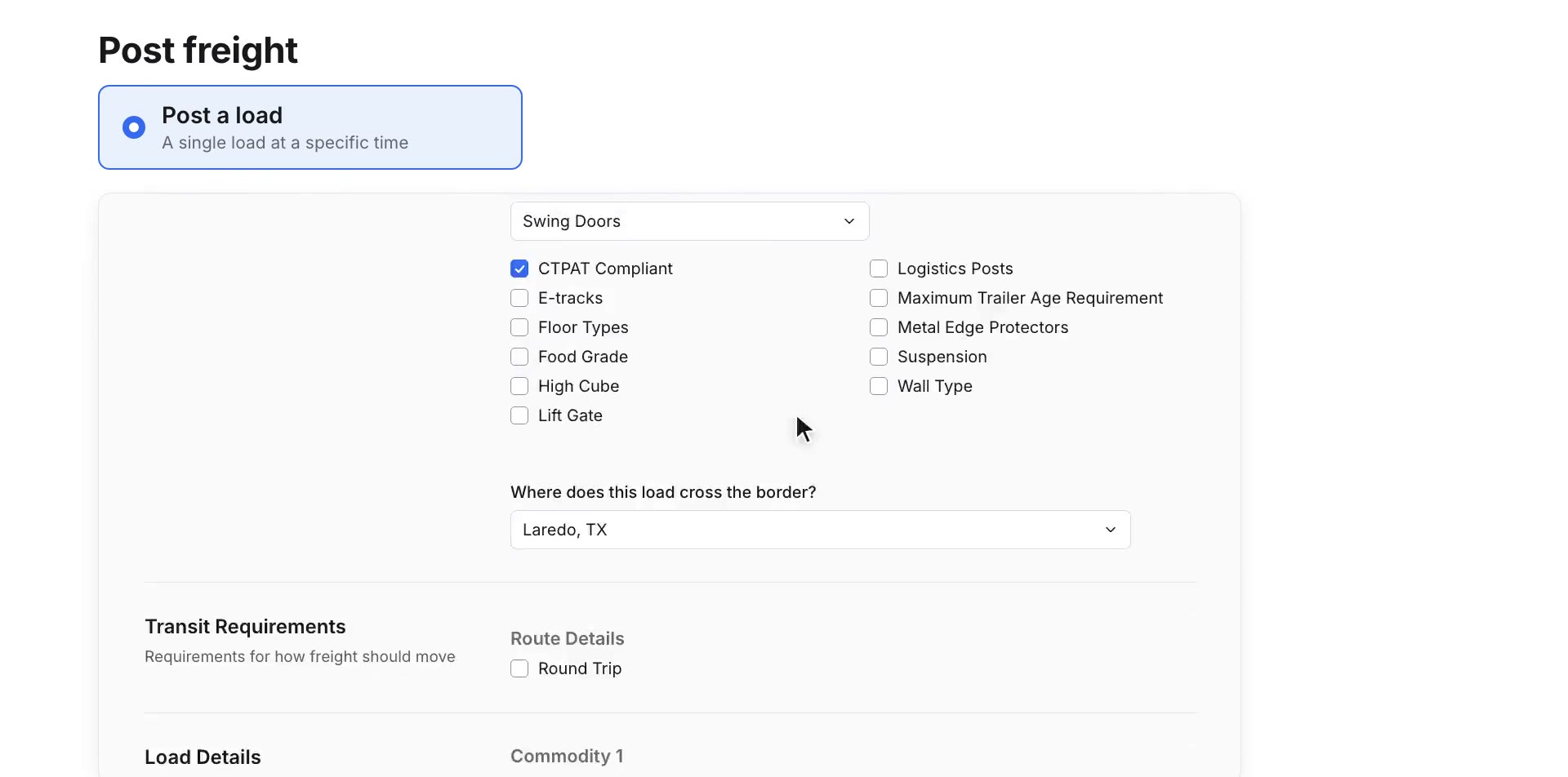
Now find the truck. There are four ways to post. A load is one shipment. A lane is freight that repeats. A potential load or lane is freight you're still quoting, so you can line up carriers before you win it. Choose the trailer: dry van, reefer, flatbed, or something more specialized. Add where it crosses the border, what's going in the trailer, and requirements like CTPAT. Block any carrier you don't want to see it. Then set your rate, with the market rate right beside it, and post.
A load is one shipment. A lane is freight that repeats. A potential load or lane is freight you're still quoting, so you can line up carriers before you win it.
Pick the trailer, from dry van and reefer to flatbed, stepdeck, RGN or conestoga, and where it crosses the border. Add what's in the trailer, like weight, commodity and packaging, plus requirements such as CTPAT, and block any carrier you don't want to see the load.
Enter your rate with the market rate for the lane right beside it, and post.
More about step 1
Trailer type and border crossing, plus what's in the load: weight, commodity, packaging, and requirements like CTPAT or hazmat. You can also block any carrier you don't want to see the posting.
Yes. Block a carrier on the posting, or mark it do-not-use once and it never sees your freight again, including loads that come in automatically from your TMS.
Then the bids come in.From carriers who run the lane.

Step 2
Your load reaches the carriers that actually run it, and you can go to them too.

So who sees it? Not everyone. The posting only goes to the carriers who will actually haul that freight: the right equipment, the border they cross, the lanes they serve. What is left is ordered by what they have actually done: the lanes they have bid and hauled, the preferences on their profile, and the trucks they have posted empty nearby. And a carrier you have marked do not use never sees your freight. When you post, carriers who fit the lane get a notification on the channel they use: WhatsApp, email, or the Cargado app. You don't have to wait for them. Cargado shows you carriers who've already run this lane. Open a profile, check their certifications and fleet, and message them directly. Bids come in on the load. Compare them side by side, chat with the carrier, and accept the one that works.
Your posting only goes to the carriers who will actually haul that freight. Cargado holds what each carrier runs: their equipment, the borders they cross, the areas they serve, certifications like CTPAT and hazmat, and the channel they answer on.
What is left is ordered by what they have actually done: the lanes they have bid and hauled, the preferences on their profile, and the trucks they have posted empty nearby. A carrier you have marked do-not-use never sees your freight.
When you post, carriers who fit the lane get a notification on the channel they use: WhatsApp, email or the Cargado app.
See carriers who've already run it, check their certifications and fleet, and message them directly. Messages are translated between English, Spanish and French.
Compare bids side by side against the market range, chat with the carrier, and accept the one that works. Then book it with the carrier the way you normally do.
More about step 2
Only the carriers who can actually haul it: matched on equipment, the borders they cross, service areas and certifications like CTPAT and hazmat, then ordered by what they've actually bid and hauled before. A carrier you've marked do-not-use never sees it.
Carriers join Cargado free, but only after verification, so we can be selective about who's allowed to bid on your freight.
Step 3
Posting loads like this one from a TMS? Connect it, and your loads, carrier statuses and rates stay in step with Cargado.

And if your team lives in a TMS, Cargado connects to it. McLeod, Turvo, Tai and Revenova, with more on the way. Loads that match your rules post to Cargado on their own, and come off the board when they're covered. Your carrier statuses sync too, so a do-not-use carrier never sees your freight. Rates reach your pricing tools through the Cargado API. And if you run your own in-house system, we do the heavy lifting to connect it.
With McLeod, Turvo, Tai and Revenova, loads that match your posting rules go up on Cargado on their own. Carrier bids come back to the load in your TMS as quotes, and the booking goes back too. Loads come down when they're covered.
More integrations are in flight, and if you run your own in-house system we do the heavy lifting to connect it.
Your carrier statuses sync to Cargado, so a carrier you've marked do-not-use never sees your freight.
More about step 3
McLeod, Turvo, Tai and Revenova today, with more integrations in flight.
If you run your own in-house system, we do the heavy lifting to connect it.
Already in a TMS?Post and sync from there.
HQ for your Mexico and Canada freight.Get started
No commission. Unlimited users on every plan. Approved and posting, often within minutes.
“Within 36 hours of starting with Cargado, we moved our first Mexico load without a hitch. I was wowed with how easy it was to source the capacity.”
 Will HopkinsCofounder, Blackbox Logistics
Already running Mexico freight out of Laredo, Monterrey or both? Put every office on one network of 2,400+ vetted carriers, price lanes from real carrier bids, and keep your TMS in charge. Book a 30-minute demo and we’ll walk you through it on your own lanes.
Smaller team, or new to Mexico? Plans start at $500 a month. See pricing
We check your brokerage and email you a pay link during business hours. Once you pay, your whole team can start posting.
We check your brokerage before the demo. Have your DOT# or RFC handy, then pick a time with our team.
Loading the form…
About two minutes.
Rather talk to us first? Book a demo meeting Got trucks? Get free marketplace access →
Brokerages are checked before they post, so carriers know who each load comes from.
Once you’re in. What your team runs from day one.
Your TMS stays in charge: loads sync in and bids come back as quotes.
Want to see it first? Watch while you fill it in.
Your first 10 minutes
Market Rates shows the range carriers actually bid, so every rep quotes from the same number.
Describe it, set your rate, and it goes out to vetted carriers. Or let your TMS send it.
Chat with carriers and accept the bid you want. No commission on your loads.
While you wait: · ·
Who it’s for
Your Mexico offices already have carriers, customers and a TMS. Cargado adds vetted capacity and bid-backed pricing to the operation you’ve built.
Every carrier is checked through the FMCSA or SICT and turned on by our team, so your loads reach carriers beyond your own list.
Every rep quotes from the same bid-backed range, in the app, in Excel or through the Cargado API.
Apply your own compliance requirements before you award, and keep rate confirmation, onboarding and payment between you and the carrier in your own TMS.
Each Mexico office works the same carrier network, on one account.
“Cargado Market Rates helps us quote fast, and that’s when you win it. Customers ask for a rate at 11, and by 11:30 they have it. That speed puts a smile on their faces.”
Patty HinojosaVP of Mexico Sales and Operations, CargoQuotes
Read the CargoQuotes story
Pricing
Pick a plan by how many loads you post and rates you look up each month.
Unlimitedpostings and rate lookups, custom pricing
Get Enterprise pricing$500a month
$849a month
$1,499a month
On every plan
Over your plan’s usage? Talk to sales. Starter, Team and Growth: pay monthly, quarterly or annually, with a discount for paying ahead.
The tour
Follow one dry van load from Monterrey to Chicago in four steps.
What brokers ask before they post their first Mexico load on Cargado.
Our team is ready to answer specific questions about your shipping requirements
Contact UsNo. Carriers join free after verification, which lets us be selective about who can bid on your freight.
Plans start at $500 a month for 25 load postings and 50 rate lookups. Team is $849 and Growth is $1,499 a month, and Enterprise is custom pricing with unlimited postings, rate lookups and users. Every plan includes unlimited users and Market Rates, with no commission on your loads. Over your plan's usage? Talk to sales.