
Post your trucks on Cargado
Send your truck list by WhatsApp or email, or post it in the app. Tell us where each truck is headed, and we send only loads going your way.
New to Cargado?
Sign up first. Cargado is free for carriers in Mexico, the U.S. and Canada.
Sign up free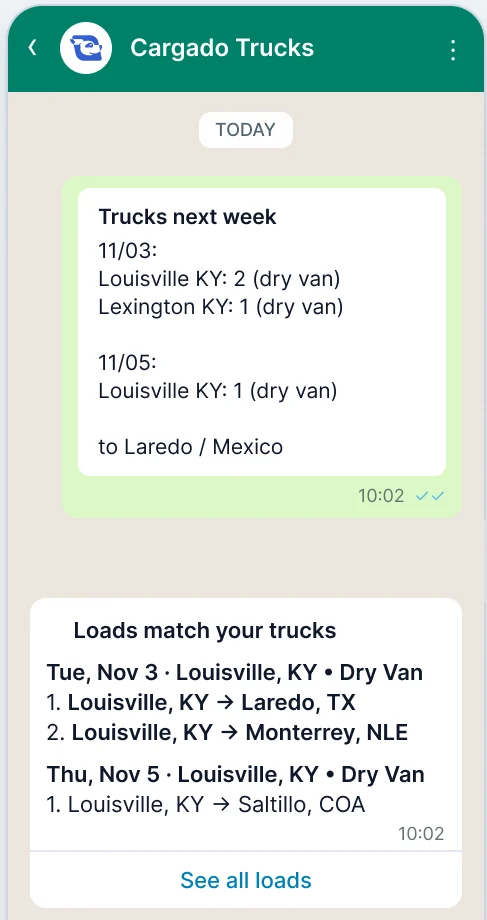
Three ways to post your trucks
Use the one you already use for your truck list.
Message Cargado Trucks at +1 (956) 539-3145.
- 1
Message Cargado Trucks at +1 (956) 539-3145 from the phone number on your Cargado account.
- 2
Type your truck list, or send a photo or screenshot of it. Send the whole list in one message. Each new WhatsApp list replaces your last one.
- 3
Read our reply. It usually comes within a minute, with any loads that fit.

Cargado Trucks
+1 (956) 539-3145
Scan with your phone's camera to open the chat.
Send your list to trucks@cargado.com.
- 1
Write to trucks@cargado.com from the email you use to log in to Cargado.
- 2
Type or paste the list in the body of the email. Each new emailed list replaces your last one.
- 3
Read our reply in the same inbox, usually within a minute.
Sending a new list? Send a new email instead of replying to ours. A reply to our email goes to our carrier team and isn't read as a list.
Email trucks@cargado.comMonday
Louisville, KY: 2 dry vans to Laredo, TX
Lexington, KY: 1 reefer to Mexico
In the app
Post a truck and see the loads near it.
- 1
Log in and open Find Freight. Under Posted Trucks in the blue sidebar, click Post.
- 2
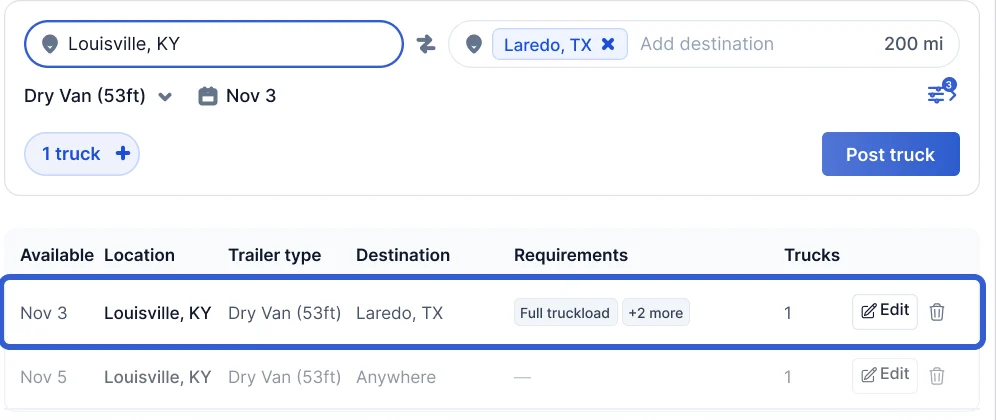
Type the city where the truck is, then choose the trailer type and the day it's free. Click + if you have more than one truck there.
- 3
Choose where you want to go, or keep your company's service area. Click Post and Search to post the truck and see loads near it.
Upload a screenshot or photo
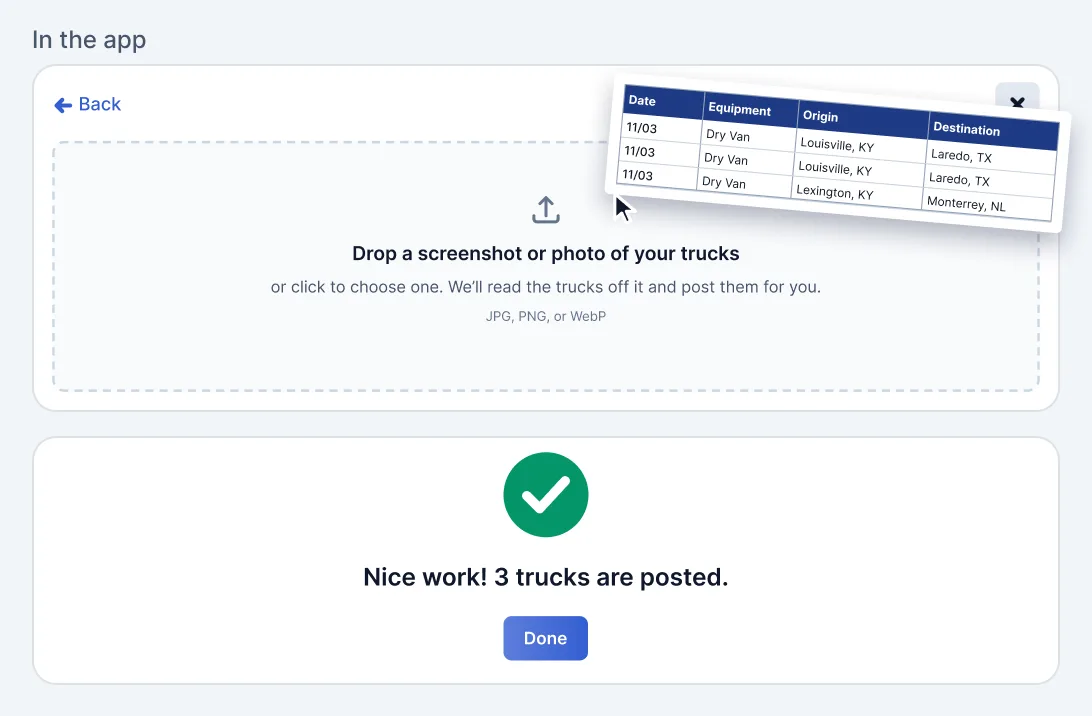
Have a long list? Post the trucks from a screenshot or photo of it instead of typing each one.
- 1
On the Post a truck page, click Upload trucks. In the form, you can also click Upload a screenshot or photo next to Have a long list?
- 2
Drop a screenshot or photo of your list, or click to choose one.
- 3
When you see Nice work!, click Done. Your trucks show under Posted Trucks.
What to put in your list
Write it the way you already send it to logistics companies. For each truck, say:
- The day it's free, like Monday.
- Where it's empty: the city and state, like Louisville, KY.
- The trailer type. If you leave it out, we post it as a dry van (53ft).
- How many trucks, if more than one.
- Where it's headed: a city, a state or a whole country. We send only loads going your way.
A line with no place or no day is skipped. Need a border crossing or special requirements? Set them on the truck in the app, under More filters. Changes you make in the app to a truck from a list last until your next list sent the same way replaces it.
Example list
Monday
Louisville, KY: 2 dry vans to Laredo, TX or Mexico
Lexington, KY: 1 reefer to Monterrey, NL
Wednesday
Saltillo, COA: 1 flatbed to Texas
What happens after you send it
Same place every week? Post it once.
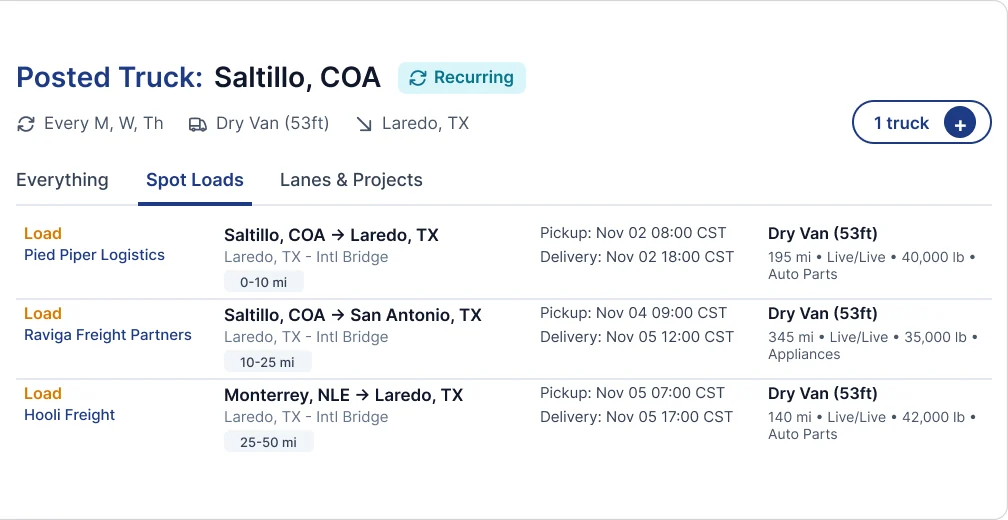
If your trucks end up in the same place on the same days, post them once as recurring and pick the days.
In its last week, a recurring truck shows as expiring. One click renews it.
Questions carriers ask
Does it cost anything?
No. Cargado is free for carriers in Mexico, the U.S. and Canada.
Do I need a Cargado account?
Yes. We only post lists sent from the email or phone number on an active Cargado carrier account. Sign up free, then send your list.
Can I send a photo or screenshot of my list?
On WhatsApp, yes: type the list or send a photo or screenshot of it. By email, type or paste the list in the body.
Who can see my trucks?
Logistics companies see a posted truck when they have a load that fits, and can reach you in Cargado chat. We don't post your number.
What if no loads match?
Your trucks stay posted. When a load going your way is posted later, we let you know by email or WhatsApp.
How do I change or remove a truck?
In the app, open the truck under Posted Trucks and click Edit, or the trash icon to remove it. A new list replaces your last list sent the same way, including any changes you made in the app to trucks from that list. Trucks you posted yourself in the app stay.
Send us your next truck list
New to Cargado? Sign up free first. Already on Cargado? Post in the app, or send your list on WhatsApp or by email.
Step by step: How to send us your truck list and How do I post an empty truck?