
Mexico and Canada freight for 3PLs, without building a Mexico division first
Some of your shippers already have Mexico or Canada freight, and someone else is moving it. Post their loads and lanes once so carriers Cargado has reviewed can bid, and quote from rates built on real carrier bids. Your TMS stays the system of record.
Run each shipper's freight the way it ships
Each shipper has its own lanes, equipment and requirements. Cargado lets you run each program on its own terms.
Rules by shipper and lane
With your TMS connected, posting rules decide which loads reach carriers. A rule can keep a load inside your own carrier network, or post it to the marketplace. Rules can use lane and equipment type, so dry van and flatbed on the same lane can follow different rules.
Your carrier list, applied
Carrier Sync brings each carrier's status from your TMS into Cargado. A carrier marked Do not dispatch never sees your freight. A carrier marked Needs to onboard can see it and gets your onboarding link.
Spot, dedicated or Potential
Post a load in hand for one-off coverage, a dedicated lane to lock in rates and capacity with preferred carriers, or a Potential to gauge real carrier rates and interest before the freight is in hand.
Quote from real carrier bids
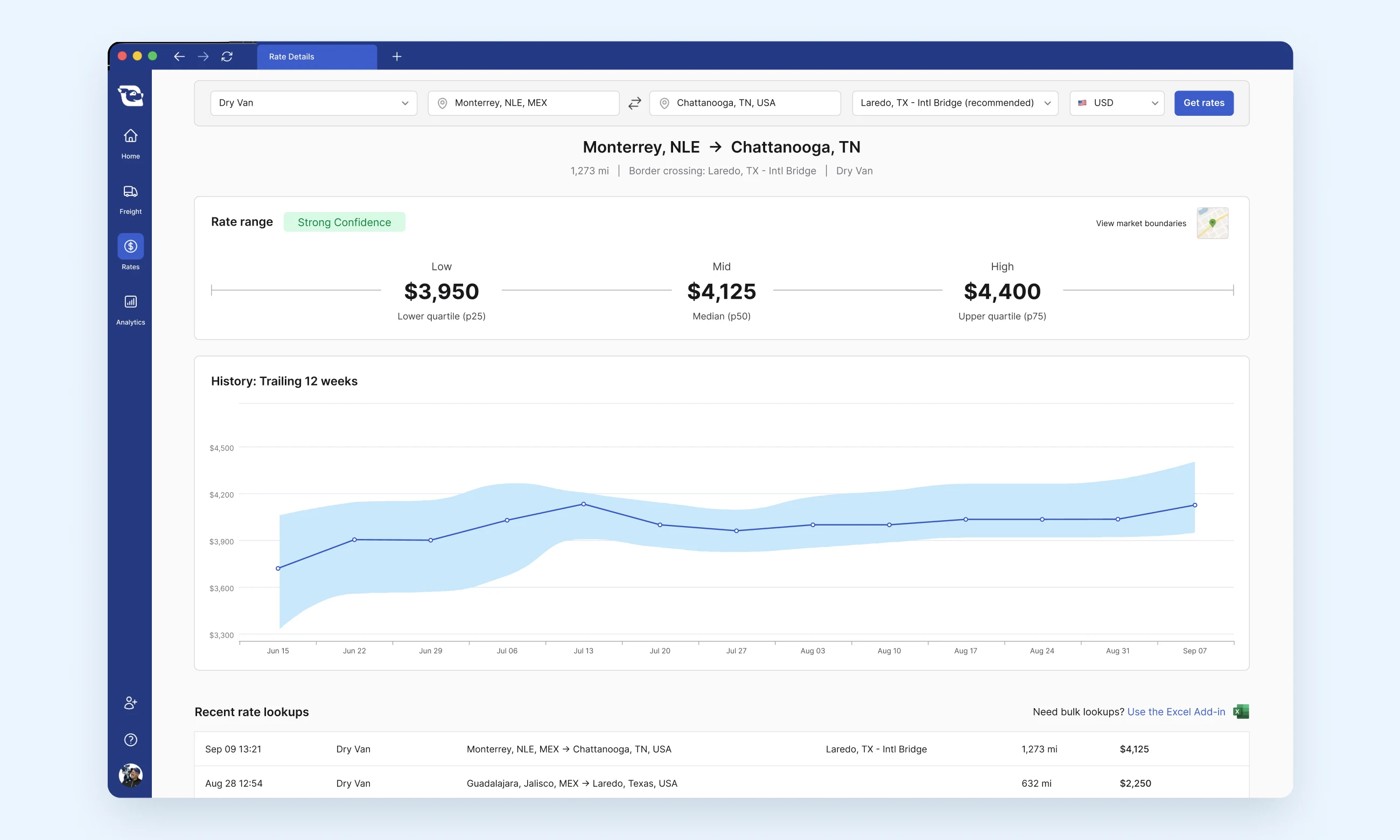
Cargado Market Rates gives you low, mid and high bands (P25, P50 and P75) for Mexico and Canada lanes. The bands are built from carrier bids placed in the marketplace and refreshed every week, with 12 weeks of lane history for context. They are carrier cost, so you add your margin. Each lane carries a confidence score that tells you how much weight to put on it, and a thin lane gets a lower score rather than a made-up number.
How Market Rates work →- Quote spot freight in the app, on desktop or mobile.
- Price a full RFP lane list in Excel with the Cargado Excel Add-In.
- Pull rates into your own pricing tools through the Market Rates API.
- Rates come back in U.S. dollars, pesos or Canadian dollars. Coverage is deepest on U.S. and Mexico lanes. Canada data is thinner, and the lane says so.
- On a thin lane, post a Potential to get live carrier responses before you commit to a number.
Carriers reviewed before they can bid
Every carrier applies, and Cargado's carrier team reviews the application before turning the account on. Until then, a carrier cannot see or bid on freight.
How Cargado vets carriers →Help article →- United States: the carrier applies with its USDOT number, and our records must show active common or contract authority before the account is turned on.
- Mexico: the carrier submits its RFC and constancia de situación fiscal, SICT operating permit, proof of address and ID for its legal representative. Companies add their acta constitutiva.
- Canada: the carrier submits its provincial safety registration (CVOR, NIR or NSC), a safety fitness certificate, a certificate of incorporation and a certificate of insurance.
- Every applicant gives three references from companies it has hauled for.
- Mexico and Canada qualifications sit on the carrier profile: CTPAT and OEA certifications, bonded status, equipment and crossings. Carriers state these themselves, so confirm them before you tender.
- Cargado's review does not replace your own carrier onboarding. You can block a carrier on any load or lane you post, and the Onboarded and Needs to onboard badges come only from the carrier statuses your company sends to Cargado.
- Chat translates between English, Spanish and French, so your team and the carrier read the same thread.
Keep the TMS your team already runs
Tai, McLeod, Revenova and Turvo connect to Cargado directly today. If your team is on another system, you can connect through the Cargado API. Ask us before you build, because we may already be working on your TMS.
- Loads sync when you save them in your TMS. Syncing is not posting: nothing reaches carriers until you or your posting rules post it.
- On McLeod, Revenova, Tai and Turvo integrations, bids come back to the shipment in your TMS, and the booking goes back too. Your team sends its own rate confirmation, and your TMS stays the system of record.
- Load status flows in from your TMS too: a load your TMS shows as booked or canceled is treated the same way in Cargado.
- Our team sets it up with your TMS admin. There is nothing to install.
A 3PL that started with no Mexico experience

The $70M Birmingham 3PL launched its Mexico business through Cargado with no in-house experience, and is now doubling down as revenue grows.
“Mexico turned out to be the easiest division we've launched, which is ironic, because going in, I thought it would be the hardest. It's been really easy because of Cargado.”
One subscription, unlimited users
3PLs, brokers and forwarders pay a subscription based on how much Mexico and Canada freight they move, with no commission or percentage on loads. Every plan includes unlimited users, and Market Rates is built in, not a separate add-on. Carriers use the marketplace free. The rate confirmation, onboarding and payment stay directly between you and the carrier.
See pricing →Questions 3PLs ask
No. Tai, McLeod, Revenova and Turvo connect directly, and other systems connect through the Cargado API. Your TMS stays the system of record: loads sync in and your posting rules decide what carriers see. On McLeod, Revenova, Tai and Turvo integrations, bids come back to the shipment in your TMS, and the booking goes back too.
Cargado's carrier team reviews every carrier's application before turning the account on: authority and company documents by country, plus three references. It does not replace your onboarding. You decide who hauls your freight, you can block a carrier on any posting, and the Onboarded and Needs to onboard badges come only from the carrier statuses your company sends to Cargado.
Plans start at US$500 a month for 25 load postings and 50 rate lookups, and Enterprise is unlimited at a custom price. Every plan includes unlimited users, with no commission on loads. Carriers use the marketplace free. See the pricing page, or talk to us.
Bring the lanes your shippers keep asking about
We will walk through the market rates on those lanes and the reviewed carriers that match them. Thirty minutes, on your team's freight.