
How do I onboard with each logistics company?
Each logistics company sets you up in its own system before it sends a rate confirmation. Use Onboard now if you see it, or ask in the chat.
Cargado connects you with the logistics company. It does not onboard you for them. Each logistics company sets up carriers in its own system, with its own carrier packet or form, before it sends a rate confirmation. Getting approved on Cargado is a separate step. See Get approved as a carrier
Step 1: Check your status on the posting
Open a posting. Next to the logistics company's name you may see Onboarded or Need to onboard. The tag shows only when Cargado knows your status with that company.
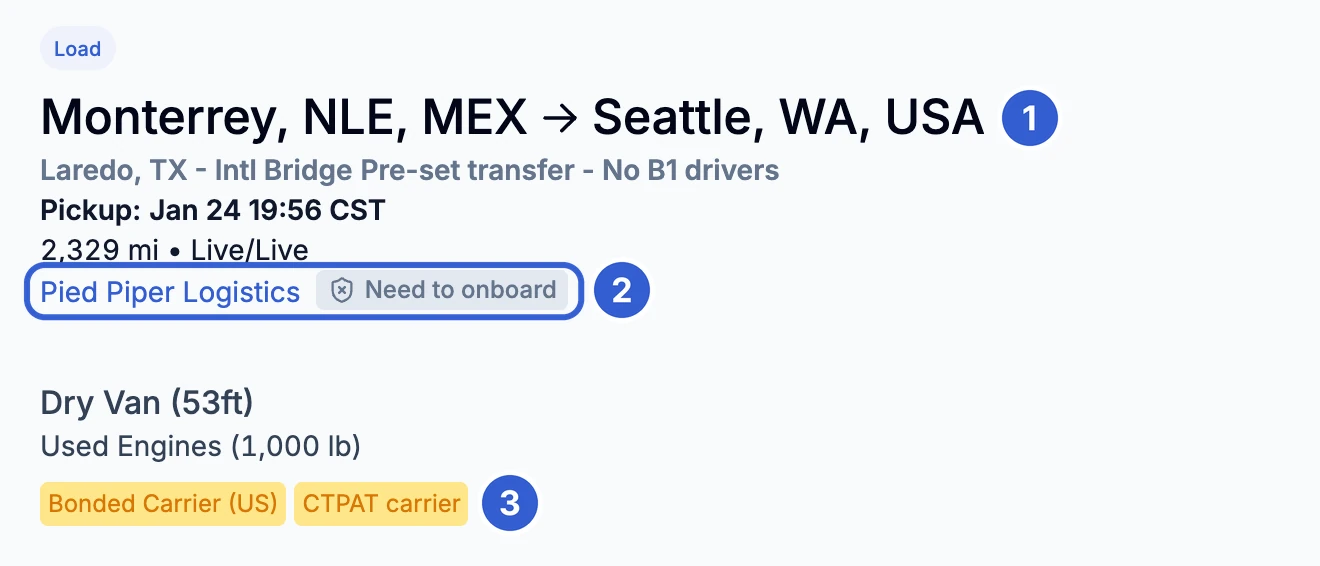
- The route and the border crossing.
- The logistics company. Onboarded means it already has you set up in its own system. Need to onboard means you onboard with them before they can book you on their freight.
- Yellow tags: requirements to check before you bid.
No tag? Cargado does not have your status with that company. Ask them before you bid. Choose Message... under Contact Broker and ask how they onboard carriers.
Step 2: After a match, use the onboarding link
When your rate is accepted, the next steps tell you if you need to onboard first. If the logistics company gave Cargado its onboarding page, you may see Carrier onboarding required before receiving a rate confirmation. with an Onboard now button.

- Onboard now: opens the onboarding page the logistics company gave Cargado. Fill it out before anything else.
Open the match message in your chat to read the next steps. If you still need to onboard and the company gave Cargado its onboarding page, one step is a link that reads onboard with and the company's name. In the match email, the button may read Onboard using Highway.
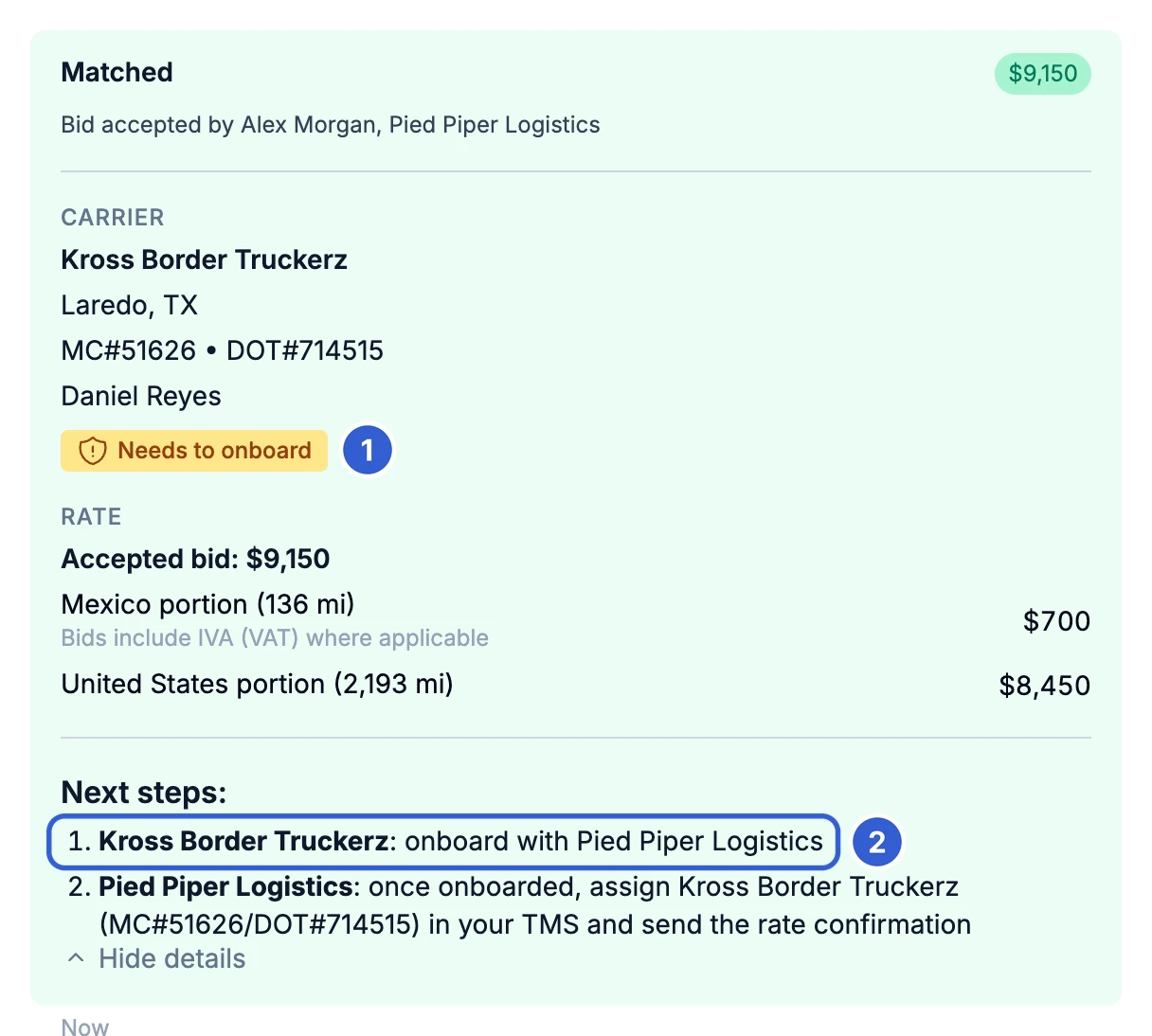
- Needs to onboard: the logistics company does not have you set up yet.
- The onboard with step: opens the company's onboarding page when it gave Cargado one.
No onboarding link, or the link does not work
Not every logistics company uses an online form. Some have not given Cargado a link. Some onboard carriers by email or send their own agreement. Some links open the company's website instead of a form, or a Cargado page that says the company onboards carriers directly.
- Open your chat with the logistics company. Use Message Broker in Rate Accepted!, or Chat in the left menu.
- Ask for their onboarding link or carrier packet. Say which load you matched on.
- After the match, phone numbers and email addresses are no longer blocked in that chat, so you can share yours.
Stuck on a packet? Email carriers@cargado.com with the company's name and the load, and we will check in with them.
No reply? See What if a logistics company does not answer my bid or send a rate confirmation?
What the carrier packet is for
Onboarding services such as Highway, MyCarrierPackets and RMIS, or the company's own form, are where you give the logistics company your details. You send the documents it asks for there, such as your insurance certificate and tax forms like a W-9.
Each logistics company decides which service it uses and what it asks for. Cargado cannot change a company's packet or fill it out for you.
If a packet asks for an MC or USDOT number you do not have
Some packets ask for a U.S. MC or USDOT number. A carrier based in Mexico may not have one. Cargado does not need one from you: at signup, a Mexican carrier gives its RFC and SCT permit. See Your DOT, MC, RFC, NSC, CVOR and NIR numbers.
- Do not enter a number that is not yours to get past a form.
- Ask the logistics company in the chat if it onboards carriers based in Mexico, and how.
- Tell them what you do have, such as your RFC, your SCT permit and your insurance.
Some logistics companies set up carriers based in Mexico outside their usual packet, so ask before you give up on the load.
Cargado cannot give you an MC or USDOT number. To check which loads you can bid on without U.S. authority, see Why you cannot bid on a posting.
Good to know
- Your status with each company: when Cargado knows a company has you set up, its postings can show Onboarded. After a match on a Load or Lane, the next steps then say the company will send the rate confirmation.
- Company profile: in a chat, click the company's name. The profile also shows Onboarded or Need to onboard when Cargado knows your status. See How does chat with a logistics company work?
- After onboarding: the rate confirmation, payment terms and paperwork come from the logistics company. See I won the freight. What happens now? and How you get paid after you win a load.
Still stuck?
Email us and a person on our team will answer. Send the posting link or a screenshot if you have one.