
What does my company need to haul Mexico or Canada loads?
Who crosses the border, what logistics companies usually ask for, and where you record your CTPAT, FAST, bond and insurance.
Each logistics company decides what its load needs, and the posting tells you. This page shows where to find those requirements, where to record what your company has, and what logistics companies usually ask for on Mexico and Canada loads.
Important: Cargado does not check your CTPAT, OEA, FAST, bond or cargo insurance. What you enter on your profile is what you report.
Step 1: Check who crosses the border
Open the posting and look at Stops. On a load between Mexico and the U.S. or Canada, one stop is the Border Crossing.
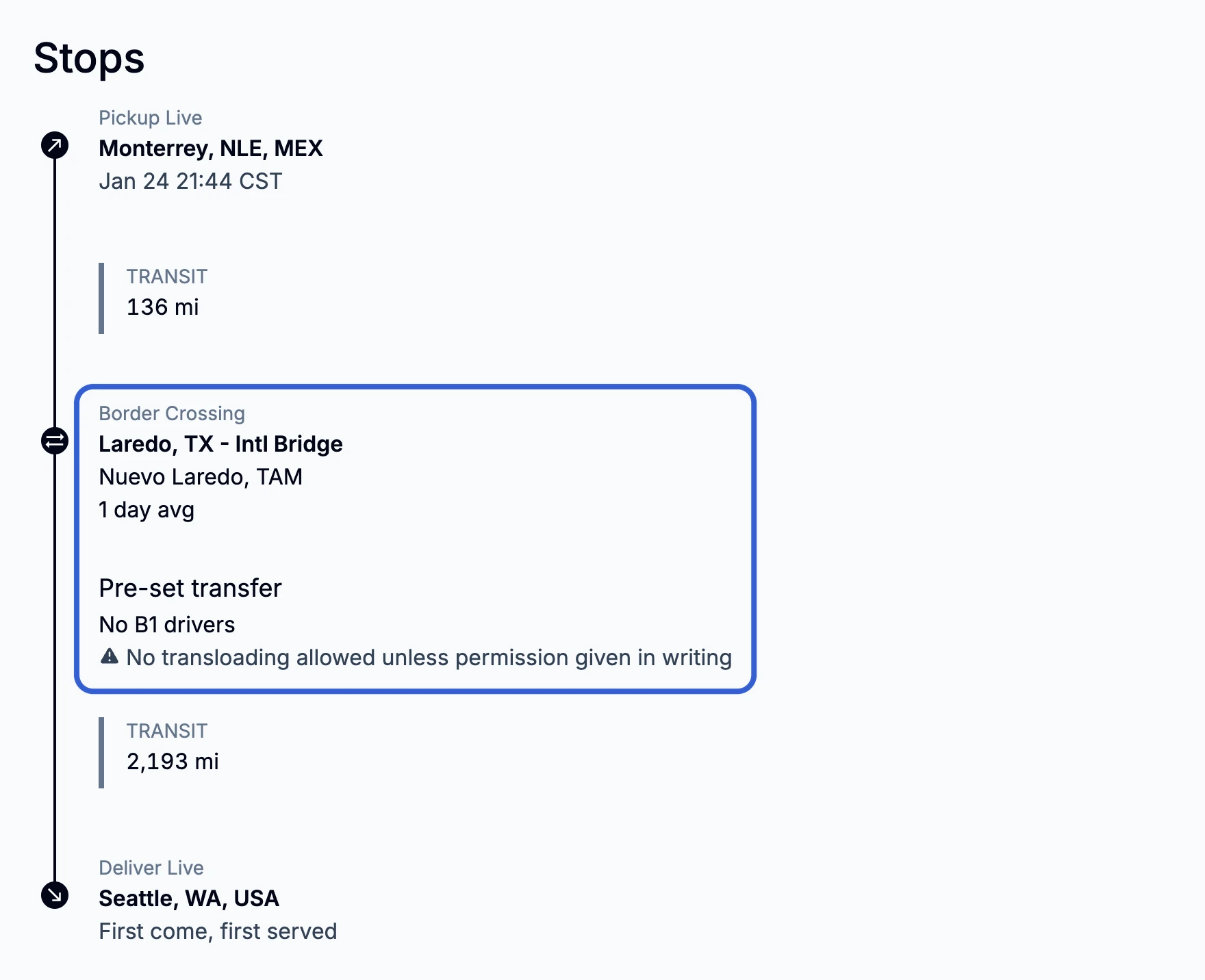
- Carrier handles border crossing: you take the freight across, with your own drivers or a crossing partner. Your bid includes the crossing.
- Pre-set transfer: someone else already has the crossing. Your bid covers the rest of the route.
- Pre-set transfer - No B1 drivers: on a load from Mexico, you cannot use B1 drivers.
A load between only the U.S. and Canada has no Border Crossing stop. More on the two options: Who handles the border crossing: Pre-set transfer or Transfer by carrier?
Step 2: Check what the logistics company asks for
Scroll to Carrier & Driver Requirements. It lists the minimum cargo insurance and what the logistics company needs from you and your driver. Yellow tags at the top of the posting point out requirements too. Read Carrier & Driver Requirements for the insurance amount and the details.

If something is not clear, click Message... under Contact Broker and ask before you bid.
Step 3: Record what your company has
Click your initials. Under Organization, click Organization Profile. Check what your company holds:
- CTPAT certified, then type your CTPAT SVI Number.
- CAAT, for carriers based in Mexico.
- Free and Secure Trade (FAST) certified.
- Partners in Protection (PIP) certified, for carriers based in Canada.
- Authorized Economic Operator, the OEA program.
- International bonded carrier, then Bonded in United States, Bonded in Canada or Bonded in Mexico.
- Your cargo insurance, under Insurance.
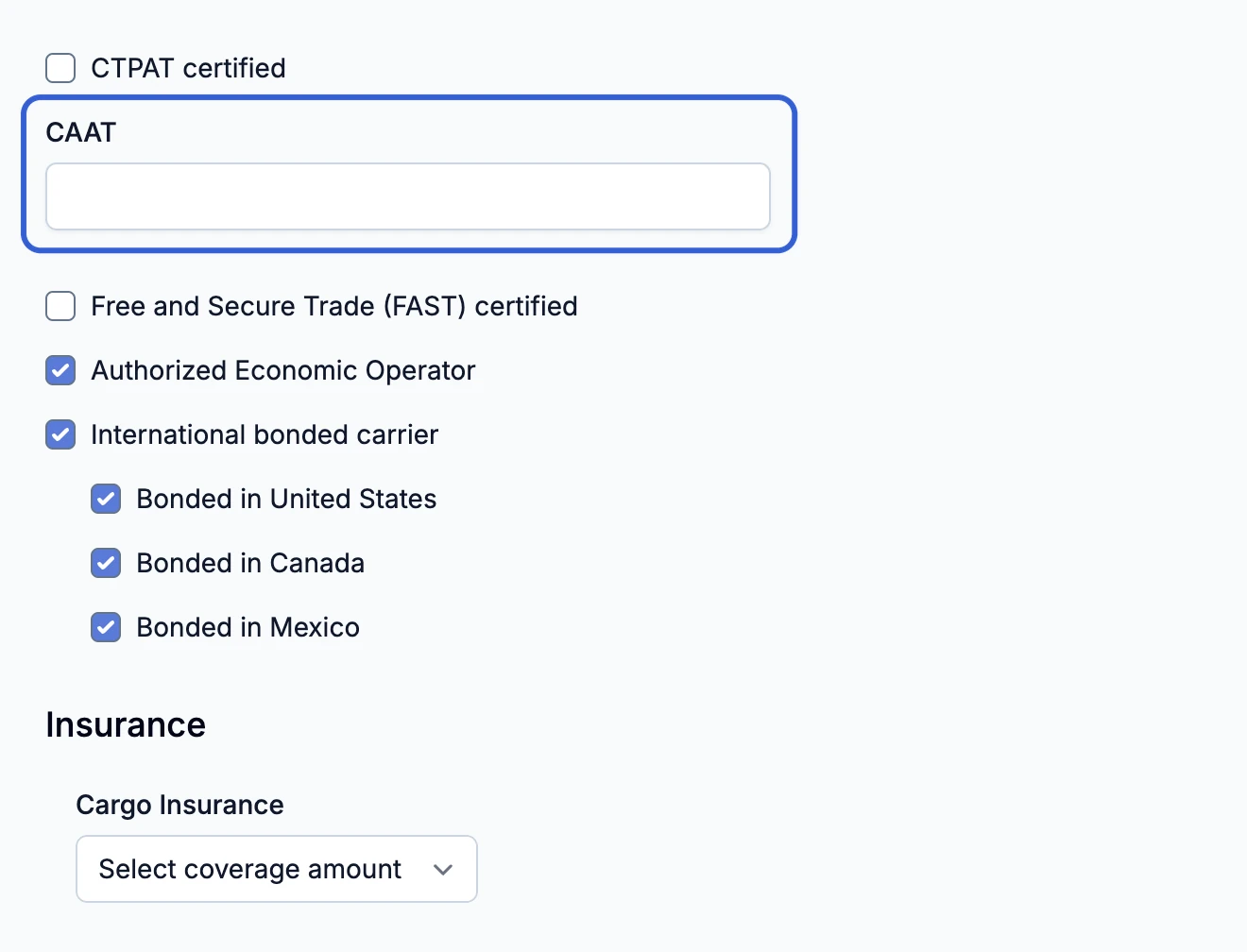
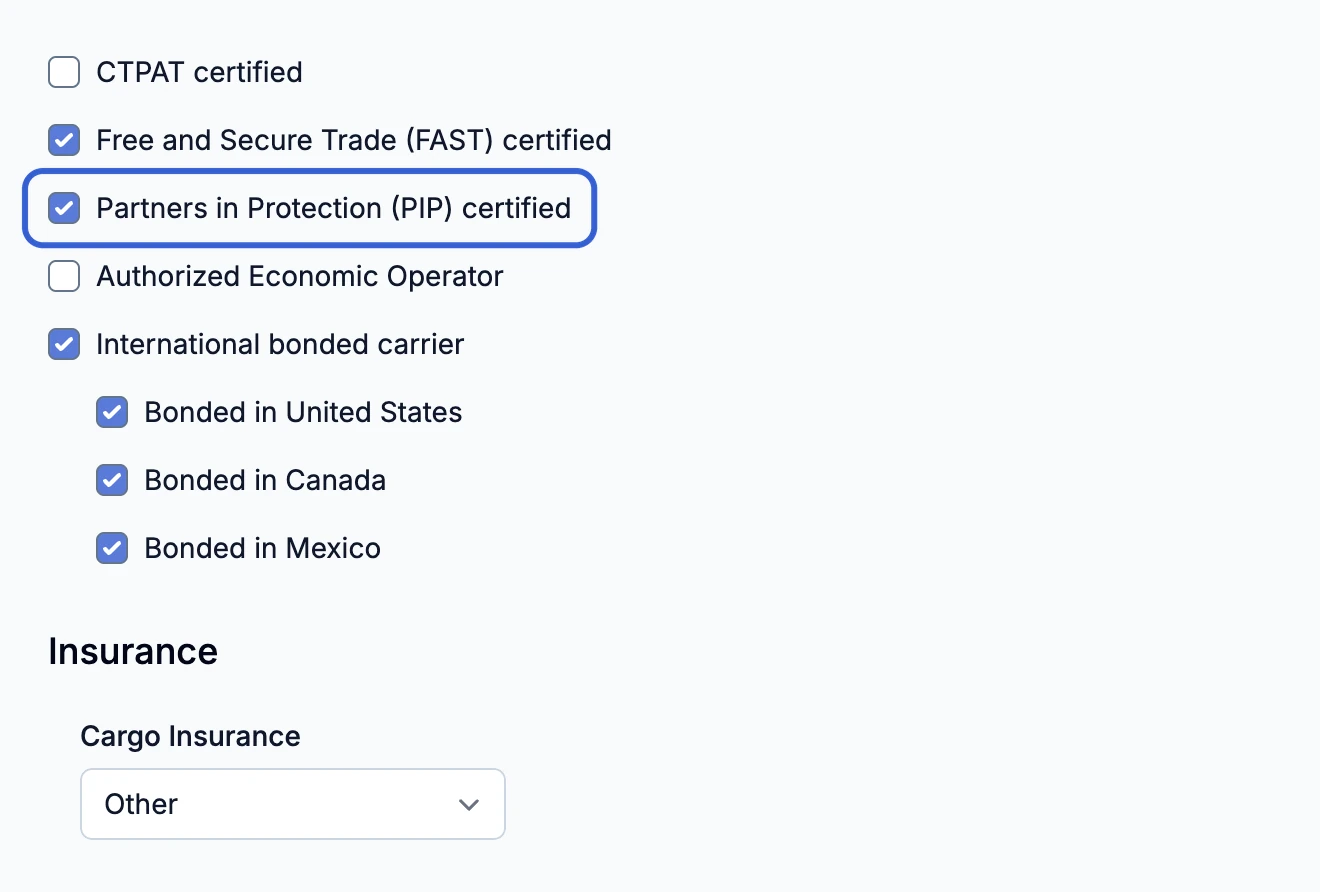
Changes save as you go. Only people who can edit your company profile can change it.
The countries and border crossings you run are under Service Areas. See How do I set up my company profile so the board shows the right freight?
Step 4: Confirm a requirement when you bid
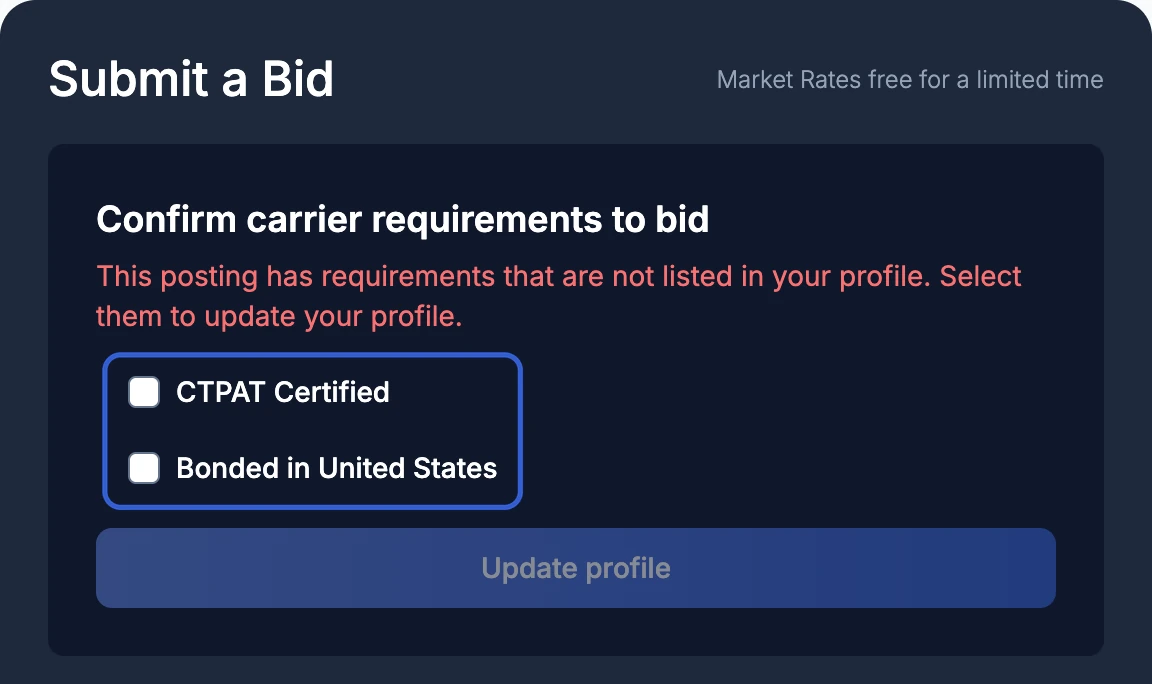
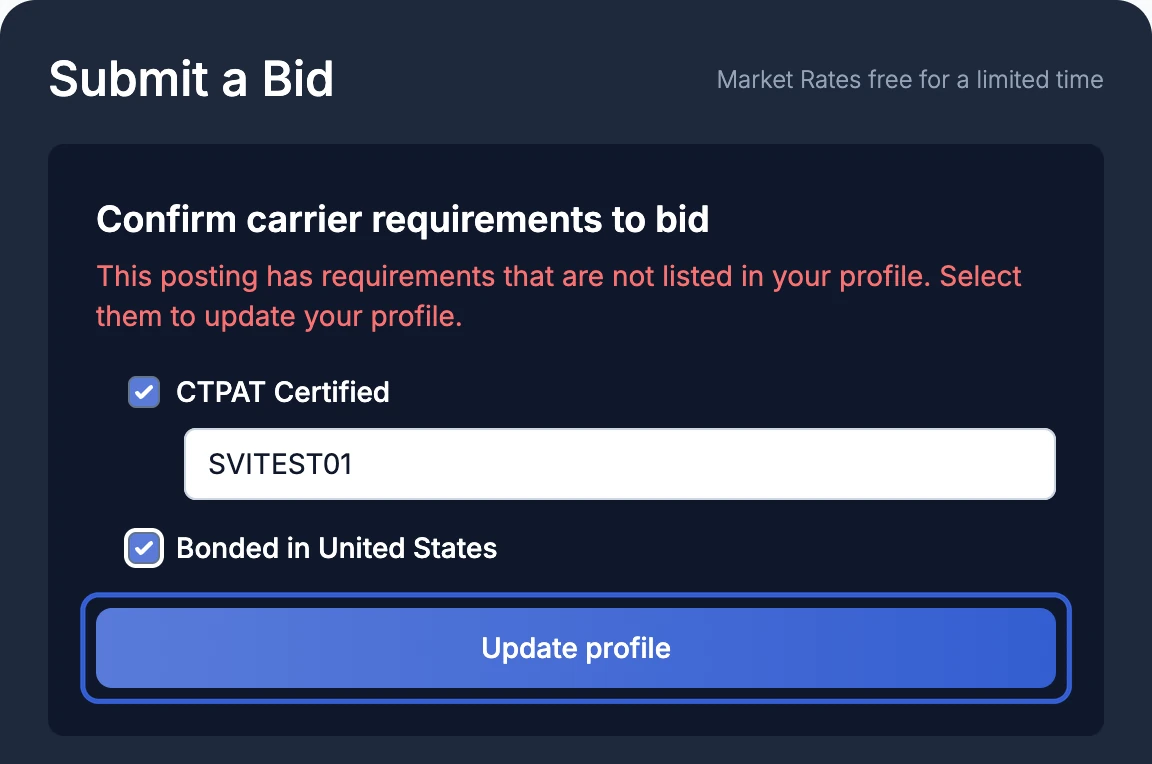
If a posting asks for something your profile does not list, the bid card shows Confirm carrier requirements to bid. You can bid after you answer it. Check only what your company really has. For CTPAT, also enter your SVI number. Then click Update profile. It is added to your profile, and the bid form opens.
What logistics companies usually ask for
Every load is different, and the posting tells you what this one needs. These are requirements you may see on Mexico and Canada loads.
- U.S. authority: a load with a stop inside the U.S., past the border zone, needs a USDOT number on your profile. So does any load between Canada and the U.S. or Mexico. Without one, the bid card says Share with your partner carrier, so a partner with U.S. authority can bid for you. See Why you cannot bid on a posting.
- Your country's numbers: USDOT and MC in the U.S., your SCT permit and RFC in Mexico, NSC, CVOR or NIR in Canada. See Your DOT, MC, RFC, NSC, CVOR and NIR numbers.
- CAAT: the code that identifies your company to Mexican customs. See CAAT.
- Carta porte: the Mexican digital waybill for the Mexican leg. See Carta Porte.
- CTPAT and OEA: the U.S. and Mexican security programs. Many shippers require CTPAT for high-value or in-bond loads. See CTPAT vs OEA.
- FAST: for FAST at the U.S.-Mexico border, your driver needs a FAST card and your company needs CTPAT. The shipment must meet the other FAST rules too. See FAST card.
- Bonded carrier: needed when a load moves in bond, such as a Mexico to Canada load that runs through the U.S. See Bonded carrier.
- B1 drivers: a Mexican driver with a B1 visa can run the international leg in the U.S., not a trip between two U.S. points. See B-1 driver.
- Cargo insurance: the minimum is on each posting, under Carrier & Driver Requirements.
Good to know
- Domestic loads: a load that moves only inside one country goes to carriers based in that country. This is cabotage law. See Why you cannot bid on a posting.
- Requirements and bidding: CTPAT, FAST, PIP, OEA, bonds and insurance do not lock you out of a posting the way U.S. authority or a domestic load can. If your profile does not list one, you confirm it on the bid card first (Step 4). The logistics company decides who it books.
- Onboarding: each logistics company sets you up in its own system before it books you. See How do I onboard with each logistics company?
- Your trailer: on the posting form, a load that crosses the border offers the main trailer types, not torton, rabon or the ton sizes. See Which trucks and trailers does Cargado support?
- Questions: email carriers@cargado.com with your company name.
Still stuck?
Email us and a person on our team will answer. Send the posting link or a screenshot if you have one.