
What if a logistics company does not answer my bid or send a rate confirmation?
A bid stays open until the logistics company answers it or the posting comes down. Follow up in the chat and keep bidding on other freight.
Each logistics company decides on its own bids. Some set rules that answer right away. The rest wait until someone on their team answers. Here is what happens to your bid while you wait, and what you can do.
Step 1: Open Bids
In Find Freight, choose Bids in the blue sidebar. The list shows your bids on postings that are still active.
Step 2: Read where each bid stands
Each row shows the status of your bid.

- Counter: the logistics company answered with a different rate. It is your turn. See How do I answer a counteroffer or see why a bid was rejected?
- Bid, with your amount in gray: no answer yet. Your bid is still open.
- Rejected: they did not take your rate. You can bid again while the posting is up.
Open a posting you bid on to see your bid. While you wait, it says Bid submitted!
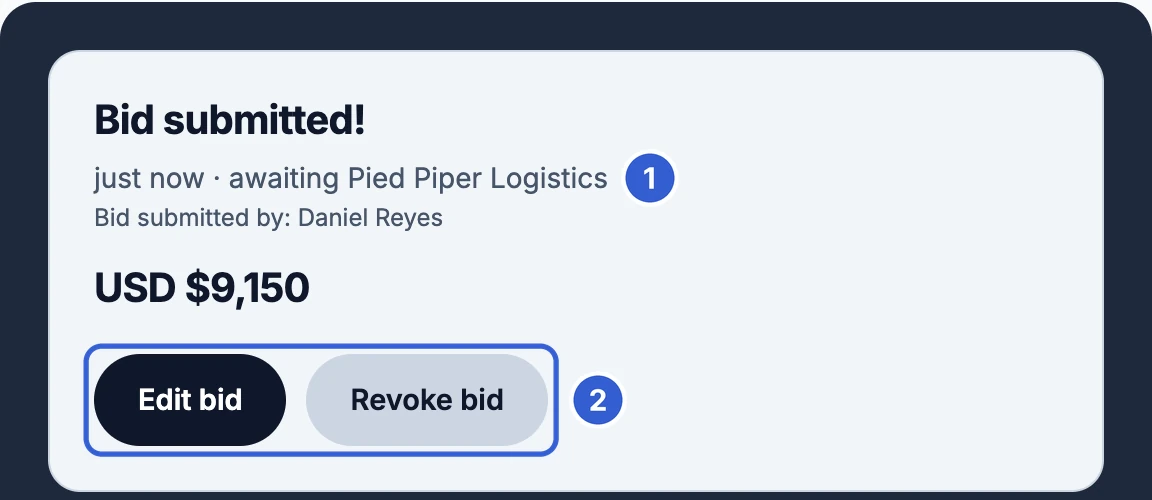
- awaiting and the company's name: no answer yet.
- Edit bid and Revoke bid: change or withdraw your bid while you wait.
On their side, your bid shows as waiting for an answer until someone accepts, counters or rejects it. A chat message alone does not answer it.
How long a bid stays open
- An unanswered bid does not expire on its own. It stays open until the logistics company answers it, you withdraw it, or the posting comes down. If you get a counteroffer, see How do I answer a counteroffer or see why a bid was rejected?
- A Load comes down when the logistics company books a carrier, when it takes the posting down, or when a set pickup or delivery time on it has passed.
- A Lane stays posted after a match. It comes down when the logistics company takes it down, when the lane's dates are over, or after the award date shown on your bid. If a Lane has an award date, your bid says the company expects to award the freight no later than that date.
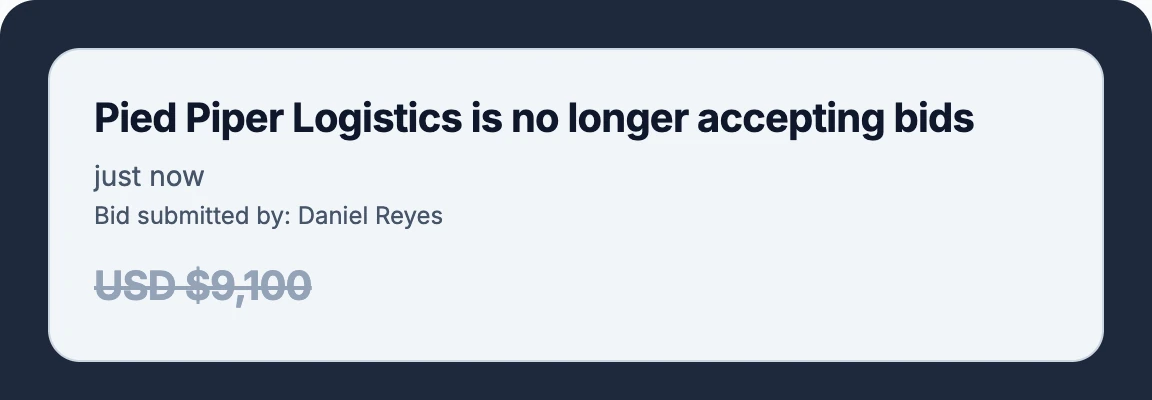
- When a posting you bid on comes down, your open bid closes. You get a notification that the posting you bid on is no longer available. Right after that, your bid says the company is no longer accepting bids.
What you can do while you wait
- Follow up in the chat. Open the posting and choose Message... under Contact Broker. Your bid shows up in the same chat. Say where your truck is and when it is free.
- Change or withdraw your bid. Open the posting. Choose Edit bid to change your rate. If the truck is no longer free, choose Revoke bid. Once you revoke a bid, the logistics company cannot accept it.
- Keep bidding on other freight. A bid with no answer is not a booking. To find more loads that fit, see How do I get alerts for the lanes I want? and How do I post an empty truck?
Still no answer after a day? Email carriers@cargado.com with a link to the posting, and we will check in with the logistics company.
You won, but have no rate confirmation yet
The rate confirmation comes from the logistics company, not from Cargado. They send it after they set you up in their own system.
- Read the next steps in the match message in your chat. If you see Onboard now or an onboard with link, finish their onboarding first. See How do I onboard with each logistics company?
- If you see no onboarding link, or you already filled it out, write in the chat. Name the load and ask if your onboarding is complete. If it is, ask when they will send the rate confirmation.
- After the match, phone numbers and email addresses are no longer blocked in that chat. You can share yours or ask for theirs.
On a Potential Load or Potential Lane, Bid used! is not a win yet. The logistics company still has to win the freight with its customer. If it wins, expect to hear from them. See I won the freight. What happens now?
Good to know
- Notifications: you get a notification when the logistics company answers your bid. Choose email, WhatsApp or push in My Notifications.
- Rejected bids: the app does not show a reason when a person rejects a bid. You can ask in the chat.
- Payment and paperwork: they stay between you and the logistics company. See How you get paid after you win a load.
Still stuck?
Email us and a person on our team will answer. Send the posting link or a screenshot if you have one.