
Get market rates through the API
What the Market Rates API returns, how to get a key, and what to know about batching, caching and test data before you build.
In 4 steps
- Ask your Cargado contact for a key
- Send a lookup to POST /rates/history
- Read the results lane by lane
- Test in the sandbox first
The Market Rates API puts the same Low, Mid and High band you see in the app into your own TMS, pricing tool or quoting screen. You send a lane, and you get back a weekly history of rates; the newest entry is what the app shows. The full reference is at docs.cargado.com.
Step 1: Ask your Cargado contact for a key
Ask your Cargado contact for an API key with the market rates permission. See Get an API key for your integration for how keys work and how to keep them safe. Send the key in an api-key header on every request to https://api.cargado.com.
Step 2: Send a lookup to POST /rates/history
Call POST /rates/history with a requests list of 1 to 16 lanes. Each lane needs:
- Stops: a pickup first and a delivery last. Places can be a structured city, a postal code, an address, or a free-text address.
- Trailer: exactly one trailer type.
- Crossing (optional, only on routes that cross the US–Mexico border): add a border-crossing stop, or leave it out and Cargado uses its recommended crossing and reports it in pricingLane. Do not add one on a route that does not cross the border.
- Route miles (optional): your own distance, if you want it to override Cargado's.
Add currency (USD, MXN or CAD) to the request. It defaults to USD.
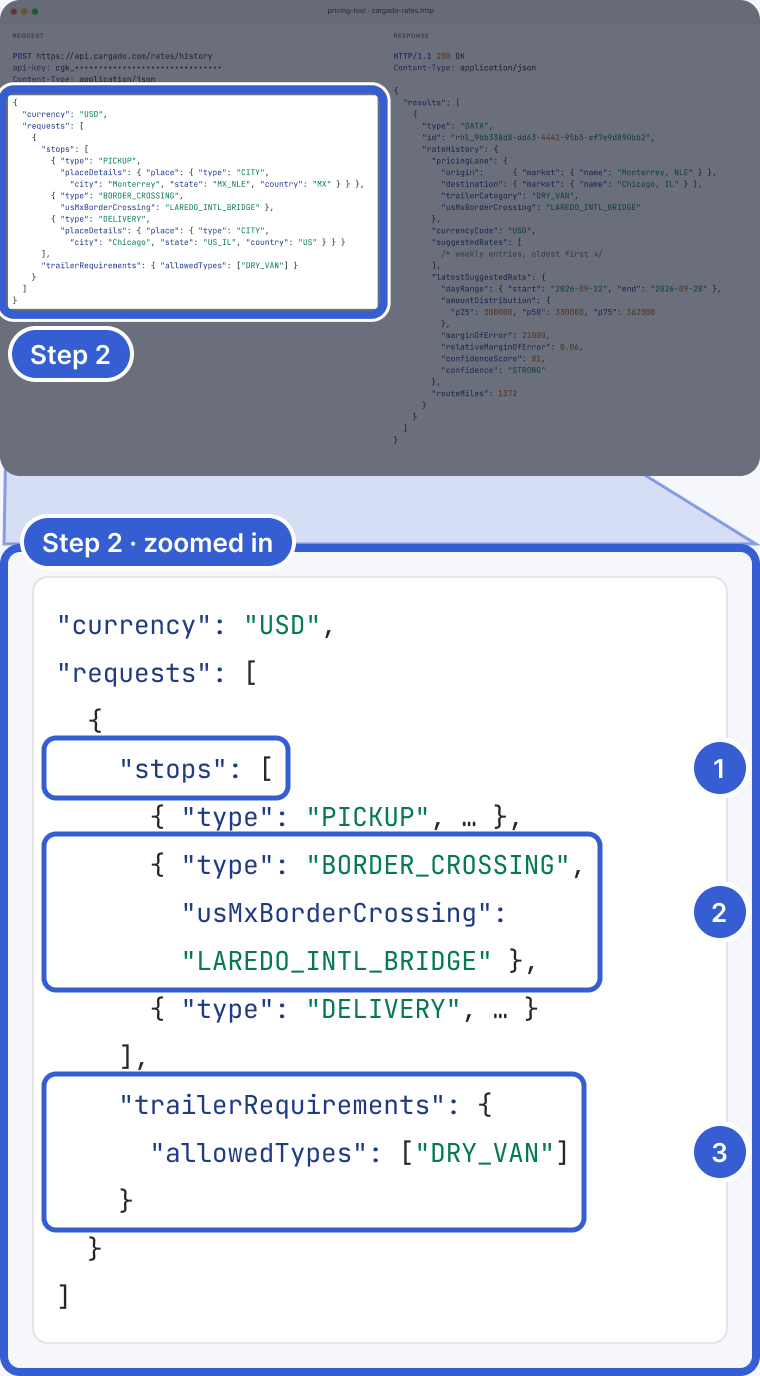
Example: a sample lane; the key in the editor is fictional and masked.
- stops: pickup first, delivery last.
- BORDER_CROSSING stop: optional, only on US–Mexico border-crossing routes. Here, Laredo.
- trailerRequirements: exactly one trailer type.
Step 3: Read the results lane by lane
Results come back in the same order as your requests, one per lane, each marked DATA or ERROR. A DATA result includes:
- The priced lane: origin and destination markets (and whether either is an extended market), trailer category and crossing.
- suggestedRates, allInRates and perMileRates: weekly entries, oldest first. Each has p25, p50 and p75 in minor currency units; margin of error and confidence are included when Cargado has them. The three series do not always cover the same weeks: perMileRates only has entries where a per-mile distribution exists.
- latestSuggestedRate: the figure the app shows as Low, Mid and High.
- Route miles, with and without deadhead to the market centers.
Some weeks may be absent. If a lane has no history, you get an ERROR result with code RATE_HISTORY_NOT_FOUND; other error codes exist for other failures.
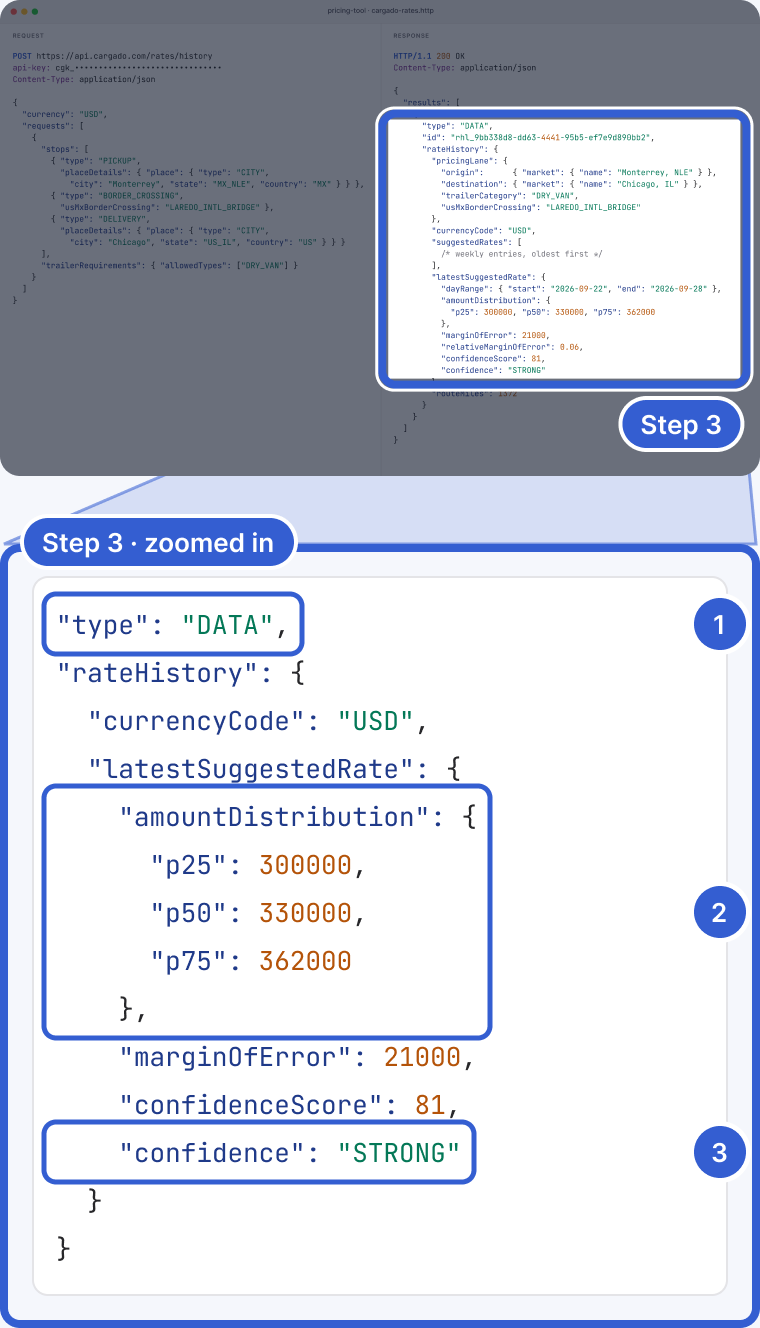
Example: the amounts and the confidence label are illustrative, not a real quote.
- type: DATA or ERROR, one per lane.
- amountDistribution: p25, p50 and p75 in cents. 330000 is $3,300.
- confidence: STRONG, MEDIUM or LOWER when present, as in the app.
Step 4: Test in the sandbox first
Ask the Cargado team for access to the sandbox at https://api.sandbox.cargado.com. By default the sandbox returns simulated rates, so use it to test your integration, never to quote.
Important: a request holds up to 16 lanes, and weekly rates come back oldest first.
Good to know
- Usage and reuse: for brokers, successful lane results count toward the plan's metered usage, the same as lookups in the app and in Excel, subject to deduplication: repeat lookups of the same lane count once per data vintage, markets, trailer category and crossing, and a new data vintage counts again. Separately, Cargado reuses a saved result instead of creating a new lookup when it already has one for the same organization, request, currency and rate data vintage. See Plan limits, and what the usage warning emails mean.
- Saved lookups: fetch a saved lookup by its id with GET /rates/history/{id}.
- One bad lane does not sink the batch: in a valid request, a lane with no data comes back as ERROR with code RATE_HISTORY_NOT_FOUND and the other lanes are processed independently. A malformed request body fails as a whole before any lane is looked up.
- Currency: amounts are in minor units of the currency you asked for: cents for USD and CAD, centavos for MXN. In USD, 330000 is $3,300.
- Route miles: each DATA result includes route miles with and without deadhead to the market centers. If you sent your own routeMiles, both use your value.
- Reference: the endpoints are documented at docs.cargado.com.
Still stuck?
Email us and a person on our team will answer. Send the posting link or a screenshot if you have one.