
Point someone to a specific posting
Postings do not show carriers a load number. Send the posting link instead.
In 2 steps
Postings do not show carriers a load or route number, so the way to point someone at a posting is its link.
Step 1: Copy the link
Open the posting in your browser. If the address in the address bar starts with app.cargado.com/posting/, that is the posting's link: copy all of it. Each posting has its own address. Whoever you send it to needs to sign in and have access to that posting to open it. If the posting has since been replaced or taken down, the link opens the newer posting, the freight record behind it, or a message that the posting is no longer available.
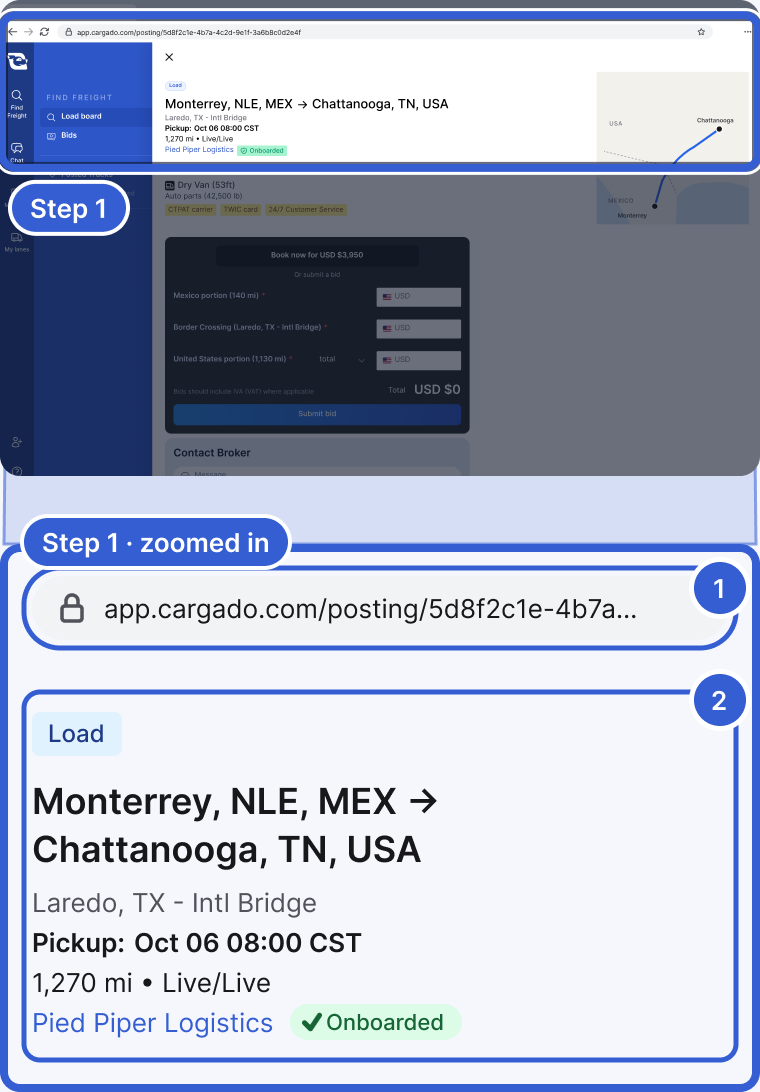
- The address bar. A posting's address is app.cargado.com/posting/ followed by its own id. Copy all of it. Your own freight pages have other addresses; this is the posting's.
- The posting that address opens.
Step 2: Send the link
Paste the link into your email or message.
- Carriers: send it to point the broker or a dispatcher at a posting.
- Brokers: send it to a carrier you already work with on Cargado. They sign in to open it, and can bid if the posting is open to them.
Good to know
- Carriers do not see the broker's internal load number: the broker's own load number is for their internal use, and carriers do not see it on the posting. Share the link, not the number.
Still stuck?
Email us and a person on our team will answer. Send the posting link or a screenshot if you have one.