
How do I cover Mexico freight?
Mexican carriers are on Cargado directly and are approved before they can bid, so you don't need your own Mexican network. You book and pay them your way.
In 3 steps
- Choose who handles the border crossing
- Read the Mexican carrier's profile
- Book the carrier your own way
You don't need your own network of Mexican carriers to reach them. Mexican carriers are on Cargado directly. Cargado approves them before they can bid, and they bid on your postings the same way a U.S. carrier does.
Step 1: Choose who handles the border crossing
On the posting form, under Border Crossing, you choose how the load moves at the crossing. Pre-set transfer means you already have a transfer arranged. For freight picked up in Mexico, that option reads Pre-set transfer - No B1 drivers. Transfer by carrier means the bidding carrier handles getting the freight across. Pick whichever matches how you want that leg handled.
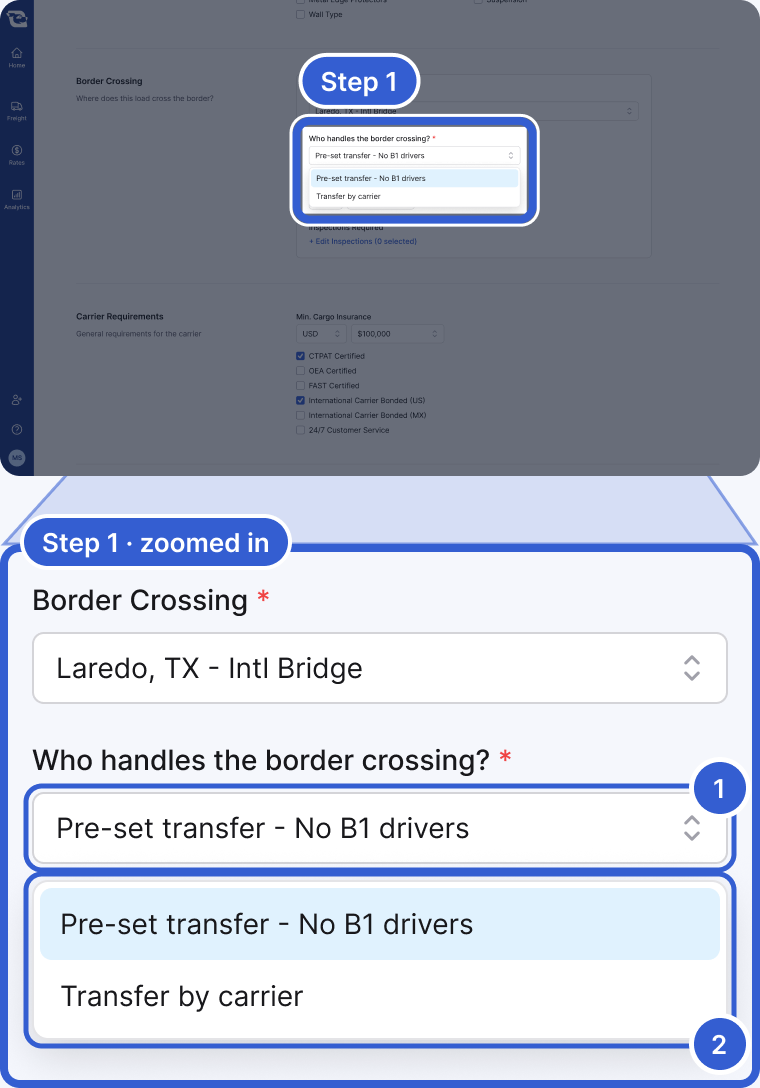
- Who handles the border crossing?: the field that sets how the crossing leg is handled.
- Pre-set transfer - No B1 drivers or Transfer by carrier: pick the one that matches how you want that leg handled.
Tip: For choosing the crossing location itself, see Which border crossing should I put on a posting?
Step 2: Read the Mexican carrier's profile
As with any posting, Cargado notifies the carriers it matches to your lane, equipment and crossing; who is notified also depends on each carrier's profile and notification settings. When a Mexican carrier bids, open its profile from the Coverage tab. The profile shows the carrier's public identifiers: its MX number and, for a Mexican company, its RFC (tax ID), plus a USDOT if it has one. The documents Cargado collects when a Mexican carrier requests access (SICT permit, constancia de situación fiscal, acta constitutiva for a company (a persona física does not provide one), proof of address and the legal representative's ID) are part of that review and are not shown on the profile.
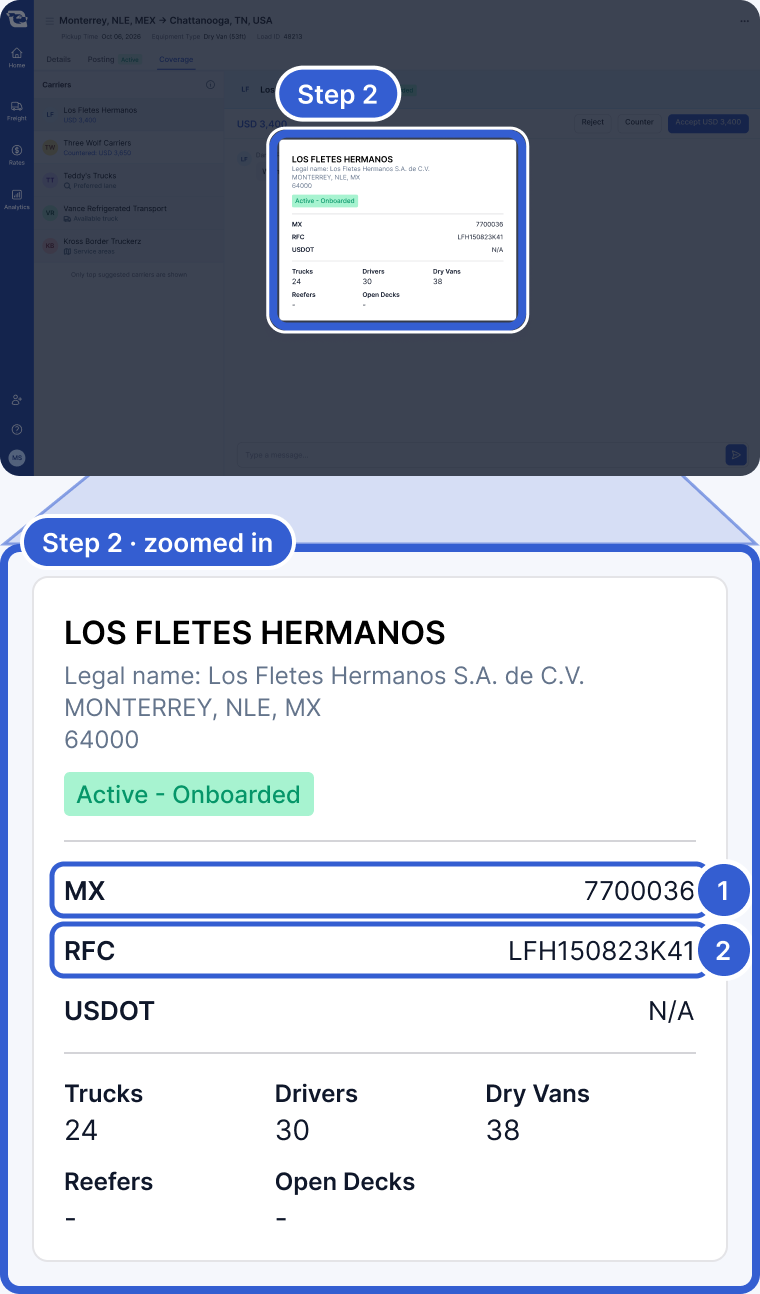
- MX: the carrier's MX number, shown when the carrier has one on file.
- RFC: the carrier's Mexican tax ID, shown for a Mexican company that has one on file.
Tip: See Part 3 · Post it right for how a posting reaches the right carriers.
Step 3: Book the carrier your own way
A match does not hand off the paperwork. If the carrier is not already onboarded with you, onboard them through your own process. You send your own confirmation of the agreed rate and pay the carrier directly.
Important: Cargado never touches carrier payment, for a Mexican carrier or any other.
Good to know
- Approval: Cargado approves Mexican carriers before they can bid. See How Cargado vets carriers for what that review covers.
Still stuck?
Email us and a person on our team will answer. Send the posting link or a screenshot if you have one.