
How Cargado vets carriers
Cargado checks a carrier's authority and identifiers before they can bid; your own onboarding still decides who you dispatch.
In 3 steps
- Know what Cargado checks by country
- Read the status badge on a bid
- Keep your own onboarding and blocks
New carrier companies apply to Cargado and wait for our team to approve them before they can see and bid on your freight. That approval is separate from your own onboarding process and does not replace it.
Step 1: Know what Cargado checks by country
- United States: the carrier's USDOT number must be on file with active common or contract operating authority, plus an MC number or a cross-registered Mexican number. A carrier with no active authority is not added to Cargado.
- Mexico: the carrier's legal name and RFC are required, and their SICT permit is collected as a document along with proof of the company's legal standing (constancia de situación fiscal, and the acta constitutiva for a persona moral; a persona física is not asked for one), proof of address, and the legal representative's ID.
- Canada: the carrier must provide at least one of NSC, CVOR or NIR, plus documents such as a safety fitness certificate and proof of insurance.
As part of setting up their profile, a carrier also gives three commercial references. For a U.S. carrier, Cargado may also confirm that the person signing up speaks for that DOT number, using the contact details FMCSA has on file for it; when that automated check is not available, our team reviews the application. Mexican and Canadian carriers upload their company documents during signup.
Step 2: Read the status badge on a bid
Open your posting's Coverage tab to see its bids. A bid can show the carrier's identifiers, such as the MC and DOT numbers for a U.S. carrier or the SICT number for a Mexican carrier (see Your DOT, MC, RFC, NSC, CVOR and NIR numbers), plus a status badge: Onboarded or Needs to onboard.
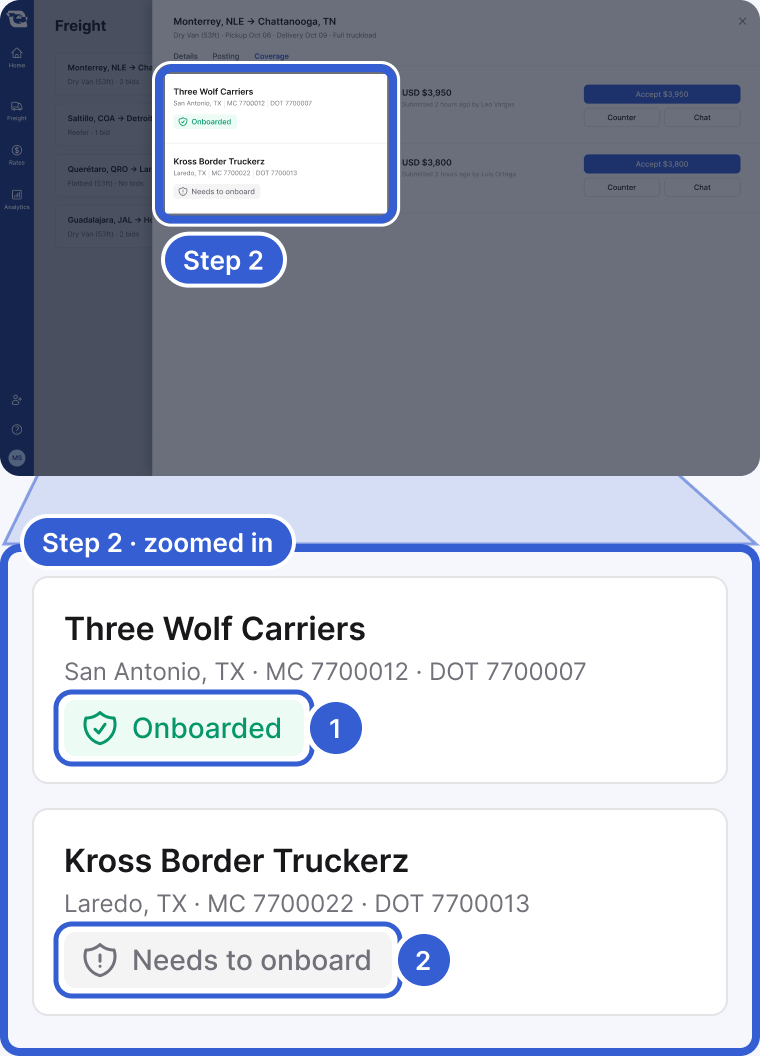
- Onboarded: this carrier's relationship with your company is active, whether you onboarded them yourself or an integration synced them.
- Needs to onboard: this carrier's relationship with your company is not active and it has not been onboarded.
Important: Cargado's approval decides whether a carrier can be on the marketplace at all. It does not replace your own onboarding: a carrier Cargado has approved is not onboarded with your company until you onboard them, and its badge reflects your own relationship with it. If your onboarding link is on file with us, the match message can send the carrier to it so they can start.
Step 3: Keep your own onboarding and blocks
You still decide who actually hauls your freight. You can block a carrier on any posting yourself, and we can block them across your whole company; a carrier blocked across your company is marked Do not dispatch. See Block a carrier from your freight.
Good to know
- Integrations: if your carrier relationships sync into Cargado through an integration, a carrier you've marked Do not dispatch never sees your freight in the marketplace.
Still stuck?
Email us and a person on our team will answer. Send the posting link or a screenshot if you have one.