
Why isn't my posting getting bids?
What Cargado's matching engine looks at when it notifies carriers, and the fixes that bring bids back.
In 3 steps
- Check who Cargado suggested
- Uncheck requirements the shipper does not need
- Message three to five suggested carriers
A posting with zero bids gives you three things to check. Cargado suggests and notifies carriers based on how your posting matches their profile and on their own settings, so start with what that match looks at.
Step 1: Check who Cargado suggested
When you post, Cargado matches it against carrier profiles: trailer type, origin and destination (city, state, market and border zone), the border crossing, and any carrier requirements you turned on, such as CTPAT, FAST, PIP, bonding, a cargo insurance minimum or hazmat. More than one path feeds the result, including carriers' saved searches, the truck capacity they posted and a relevance score, and whether a matched carrier is actually notified also depends on their notification settings and on Cargado's ranking. A gap in a profile does not always pass: a carrier who has not recorded PIP, for example, is treated as not having it. The Coverage tab on the posting shows a ranked list of suggested carriers for your lane.
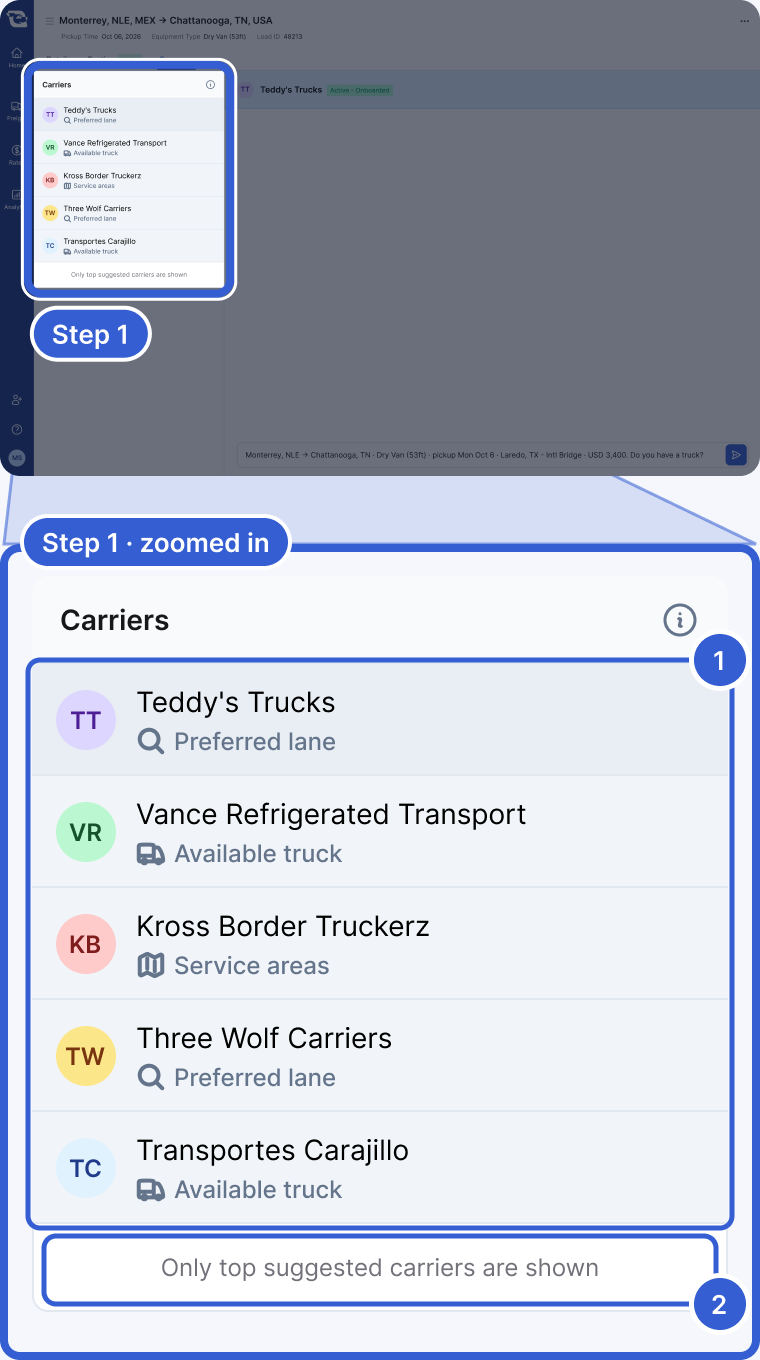
- Carriers: the suggested carriers, each with why Cargado picked it: Preferred lane, Available truck or Service areas.
- Only top suggested carriers are shown: the list is ranked and cut to the top of the suggestions. It is not a receipt of who was notified.
Important: No suggested carriers means the suggestion list came back empty for this posting. It does not say why, and it does not prove no carrier fits, but it is the first place to look for something too narrow: a requirement, the crossing or the trailer.
Step 2: Uncheck requirements the shipper does not need
A checked requirement works two ways. At bid time, a carrier whose profile does not match sees a warning on the bid; the warning itself does not stop the bid, though separate eligibility rules can. In matching, the requirement is one of the filters on who Cargado suggests and notifies, with some exceptions by carrier country. Under Carrier Requirements on the posting form, check only what the shipper actually requires. A box checked "to be safe" can narrow who hears about your freight.
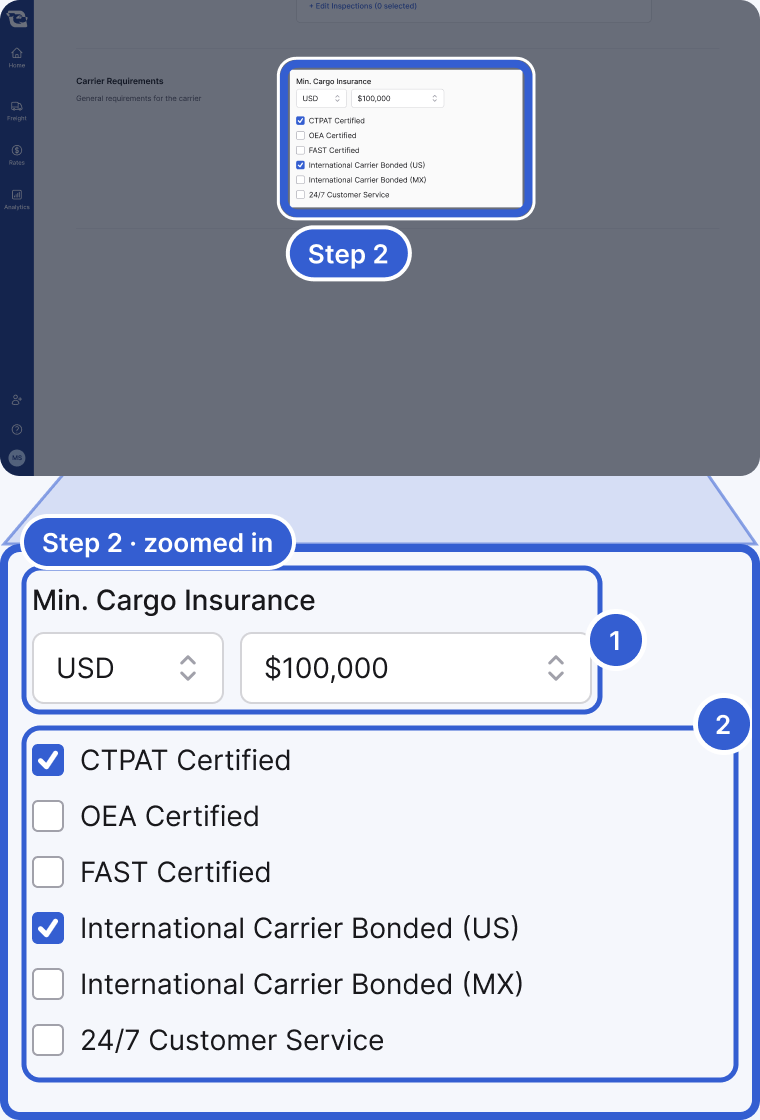
- Min. Cargo Insurance: a minimum here is one of the matching inputs. Set it to what the shipper's contract requires.
- The certification boxes: CTPAT Certified, OEA Certified, FAST Certified and International Carrier Bonded are matching filters, with exceptions by carrier country. 24/7 Customer Service is a requirement carriers see on the posting, not part of that filter.
Step 3: Message three to five suggested carriers
The Coverage list is not just a status readout. Message a few suggested carriers as soon as you post, rather than waiting on one. Give them enough to answer with: lane, pickup date, equipment, crossing and your rate.
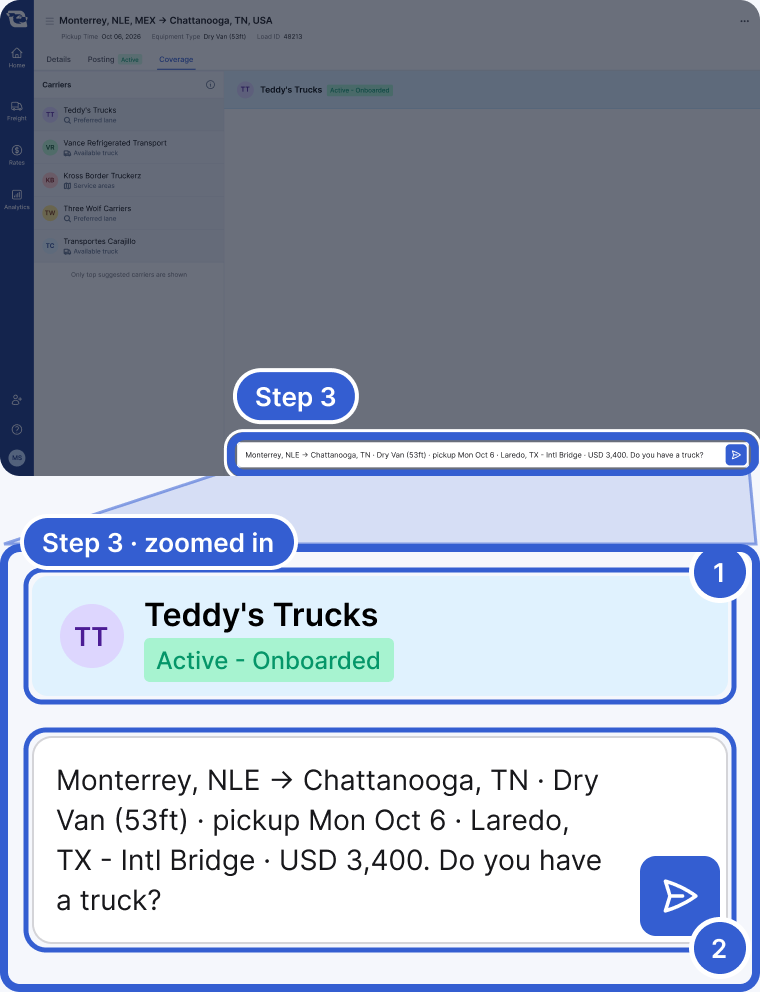
- The carrier you opened from the suggested list.
- Your message: lane, pickup date, equipment, crossing and your rate.
Tip: Keep it in Chat, not WhatsApp or a call. Chat can show each message translated, depending on the languages set on each side, and it keeps the whole conversation on the posting.
Good to know
- Target rate: Your target rate is separate from the profile filters listed above, so treat it as a pricing decision rather than a way to reach more carriers. If you checked Enable Instant Responses, the target drives what happens to each bid automatically: a bid at or under it can be accepted on the spot when the bid qualifies for an instant response; a bid above it may be countered, declined or passed to you, depending on your settings and the market data available. A declined bid does not hide the carrier: you can still open the carrier and message them. Set the target inside the Market Rate range.
- Recurring freight posted as a Load: A Load comes down when you accept a bid on it, so the same freight posted again as a fresh Load is a new posting each time. Past activity on the lane can influence carrier ranking. A Lane stays live after a match, so you can book more than one carrier off it.
- Old bids left unanswered: Open bids close when the posting comes down. Accept, counter or reject each bid while it is live, and counter a high bid instead of letting it sit.
- Timing: Post as early as the freight is real, to leave carriers time to plan.
- Bidders: Message a bidder directly from the bid list, without accepting, to send extra detail or ask for a sharper rate.
- Still quiet: The live checklist in Part 3 · Post it right covers the fast version.
Still stuck?
Email us and a person on our team will answer. Send the posting link or a screenshot if you have one.