
Download the weekly market rate export
With an Enterprise plan that has the export turned on, download a weekly CSV of market rates through the API.
In 4 steps
With an Enterprise plan that has the export turned on, you can download a weekly CSV file of market rates across lanes instead of looking lanes up one at a time. You get the files through the API with your company's API key.
Step 1: Check that your plan includes it
The export requires an Enterprise plan with the export enabled for your organization. Ask your success manager, or sales@cargado.com, whether yours includes it. If your organization's export setting is off, the API answers Market rate export requires an Enterprise plan. Contact sales@cargado.com to upgrade. Other setups return different errors.
Step 2: Get an API key
Ask the Cargado team for a key with the market rates permission; the Cargado team creates it. See Get an API key for your integration. Send the key in an api-key header on every request to https://api.cargado.com.
Step 3: Download the latest week
Call GET /rates/history-exports with no dates. The response lists the file for the latest completed market week: urls holds one entry with the download link, the day the week ended and when the link expires. If that week's file is not available yet, urls comes back empty; try again later. Each link works for one hour after it is generated.
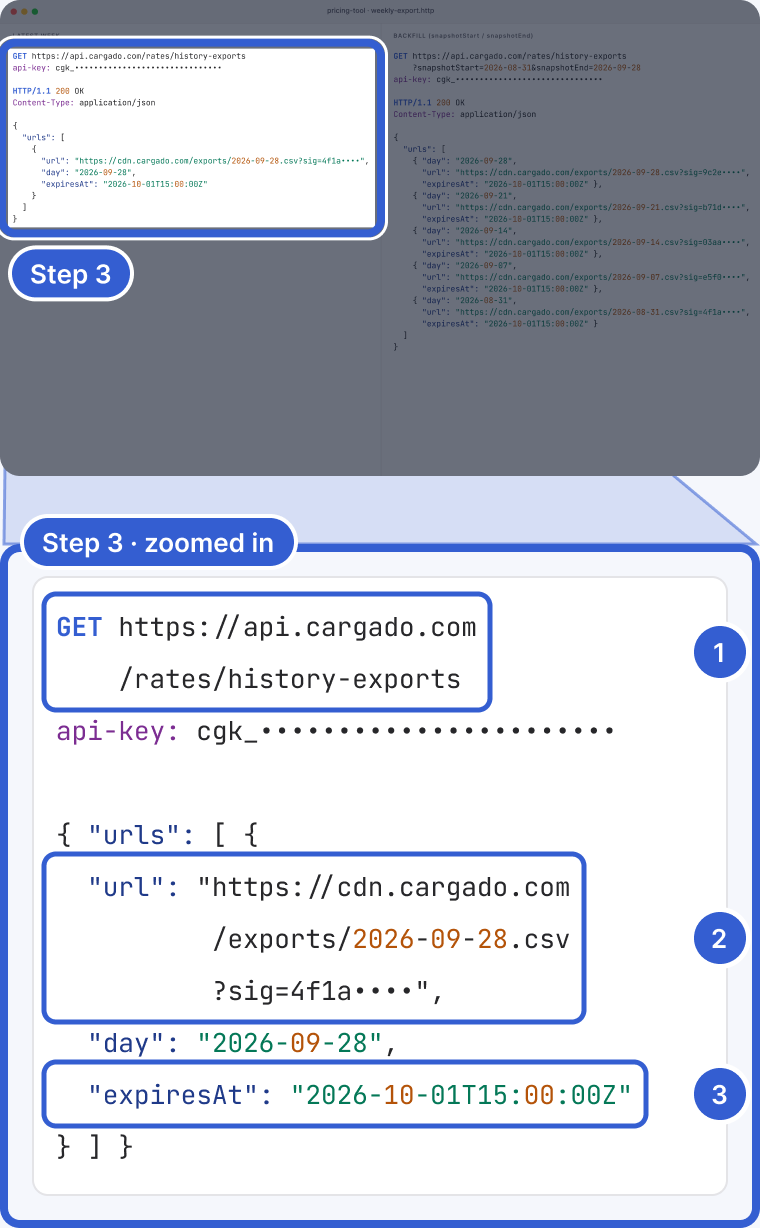
Example: the host, signature, dates and key are fictional.
- GET /rates/history-exports with no dates: the latest completed week.
- url: the download link for that week's CSV.
- expiresAt: when the link stops working, one hour after it was generated.
Each market week runs Tuesday through Monday, and there is one file per week; day is the Monday the week ended. Cargado generates the file on a scheduled job early on Tuesday (06:00 UTC, in the early hours of Tuesday, Central Time). If you automate the download, run it later on Tuesday and retry when urls comes back empty.
Step 4: Backfill past weeks
To get older files, add snapshotStart and snapshotEnd as dates (YYYY-MM-DD). Send both or neither; the start cannot be after the end, and the end cannot be in the future. You get one entry per market week that overlaps the range, newest first, up to 20 per call. Weeks whose file is missing are skipped, and because the whole Tuesday-to-Monday week counts, a week's day can fall just outside the dates you sent.
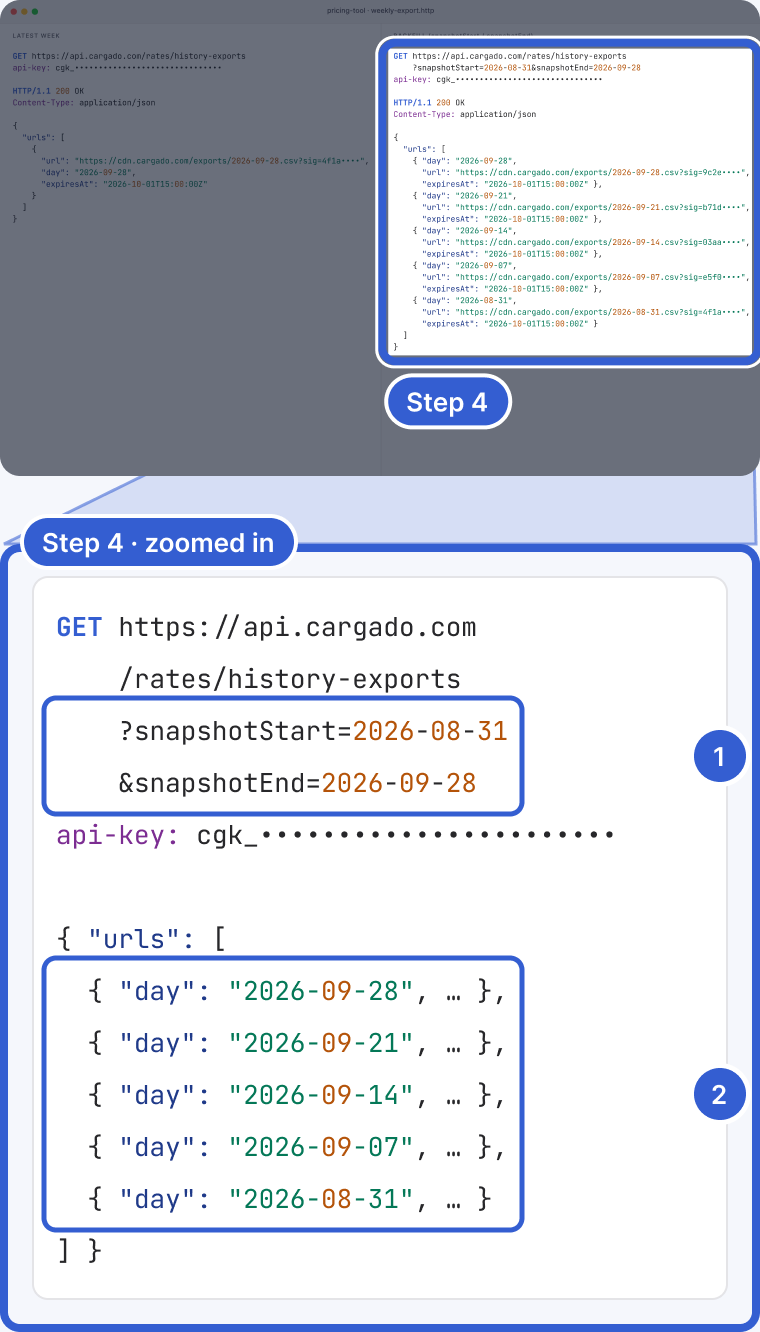
Example: the dates are illustrative; each day is a Monday.
- snapshotStart and snapshotEnd: both or neither.
- One entry per market week that overlaps the range, newest first, up to 20.
Good to know
- What is in the file: each row is one lane for one week, for the lanes where Cargado has a rate history that week (lanes without one have no row):
- start_date and end_date of the week.
- Low, Mid and High as a total (p25_amount, p50_amount, p75_amount) and per mile (p25_cost_per_mile, p50_cost_per_mile, p75_cost_per_mile), in USD. The per-mile columns can be empty.
- margin_of_error, relative_margin_of_error and confidence_score, when Cargado has them.
- Origin and destination market: ID, code, name, country and type (whether it is an extended market).
- us_mx_border_crossing and is_suggested_border_crossing, empty on lanes with no crossing.
- trailer_category.
- USD only: the export is in USD. For pesos or Canadian dollars, use a lookup in the app or the API.
- Links expire: every link in the response works for one hour. Download promptly, or call again for a fresh link.
- Related: Get market rates through the API and How to read a market rate.
Still stuck?
Email us and a person on our team will answer. Send the posting link or a screenshot if you have one.